Self-growth
 Apps & Digital Tools
 Business & Career
 Success
 Growth Tools
 Psychology
 Communication
 Relationships

Most iPhones already have two or three reading apps sitting on a home screen somewhere, downloaded with good intentions and rarely opened again. According to a Pew Research Center survey, 31% of Americans read an e-book in the past year, nearly double the 17% who said the same in 2011, with smartphones now the primary device used by most digital readers.
That's the strange part. The phone most likely to pull your attention away from reading is also the best portable reading device most of us own. This guide breaks down the 15 best book apps for iPhone by exactly what you want to do with them.
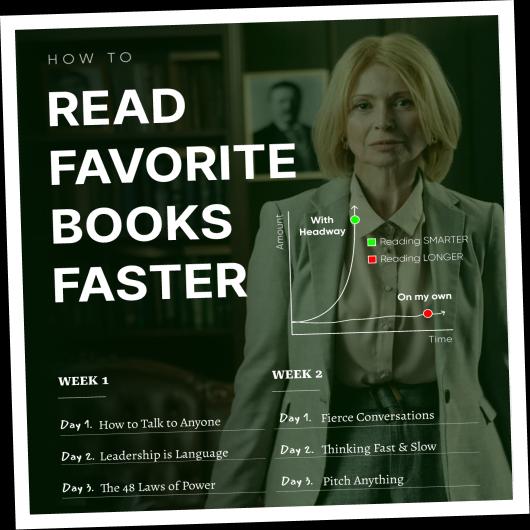
And if you want to take your reading routine one step further, try Headway for learning key ideas from top nonfiction books in a few focused minutes.
Download Headway and start turning idle minutes into daily learning while you sort out the rest of your best reading apps for iPhone setup!
Find your next favorite book faster
• 2K+ book summaries always at your fingertips
• Save audio highlights of the best ideas to
• Learn smarter in just 15 minutes per day
Quick summary: The best book apps for iPhone by reading type
Here's the short version if you're in a hurry.
Best ebook reader apps for iPhone: Kindle for the Amazon ecosystem, Apple Books for native simplicity, and Kobo for store independence.
Best free book apps for iPhone: Libby for library card holders, Hoopla for no waitlists, and Project Gutenberg for public domain classics.
Best audiobook apps for iPhone: Audible for the biggest catalog, Speechify for turning any text into audio, and Libro.fm if you'd rather support a local bookstore.
Best apps for learning from nonfiction books on iPhone: Headway, with 15-minute summaries and personalized growth plans, plus Blinkist for library size and Everand for a broader subscription library.
Best apps for tracking what you read: Goodreads for the social side, StoryGraph for the data, and Literal for a cleaner interface.
Keep reading for the full breakdown, including a comparison table and a quick way to pick the right app for your reading style.


All app features described in this article are accurate as of September 2026. Prices may vary depending on your region, current promotions, and seasonal offers.
How to pick the right book app before downloading all 15 of them
If you already have two or three book apps for iPhone sitting unused on your phone, you're not alone. Finding the best book app for iPhone is all about asking three honest questions about how you read:
Where do your books come from? Amazon purchases, library loans, your own EPUB or PDF files, or nonfiction you want summarized.
Do you read text, listen to audio, or switch between both depending on the moment?
And do you want to track every book you finish, or just read without the extra bookkeeping?
If you... | App to try first |
Buy ebooks from Amazon | Kindle |
Want to learn from nonfiction books fast | Headway |
Want something already on your phone | Apple Books |
Have a public library card | Libby |
Want to borrow without waitlists | Hoopla |
Listen more than you read | Audible |
Want the widest nonfiction summary library | Blinkist |
Track every book you finish | Goodreads or StoryGraph |
Read your own EPUB or PDF files | Kobo |
Kindle and Headway: The best book app for iPhone options readers reach for first
Before getting into every category, two apps come up more than any others when people ask for a reader app iPhone recommendation to put on their home screen. One is for buying and owning books. The other is for learning from them without reading them cover to cover.
1. Amazon Kindle
Kindle is the default for most U.S. readers, not because it's the best-designed app, but because Amazon is where most people already buy their books. Whispersync keeps your place synced between the Audible audiobook and the Kindle text version, so switching from listening on a walk to reading on the couch feels seamless.
You also get cross-device progress sync, the Bookerly font built for screens, optional Kindle Unlimited access, and X-Ray for quick character or term lookups. The one catch: you can't buy books directly inside the iOS app anymore, only through a browser, thanks to Apple's in-app purchase rules.
Best for: Readers already buying from Amazon, Kindle Unlimited subscribers, and commuters who switch between audio and text.
Cost: Free app; content purchased separately or via Kindle Unlimited at $11.99 a month.
2. Headway
Headway is built for readers who want the ideas from a nonfiction book without committing three weeks to reading it cover to cover. Summaries run about 15 minutes in either text or audio, pulled from a library of 2,500+ bestselling nonfiction titles.

Growth plans organize content around specific goals like productivity, relationships, career, or health, and daily insights arrive as short lessons you can fit between meetings.
Add in reading streaks, progress tracking, spaced repetition flashcards for retention, and offline access, and it becomes less of the best app to read books on iPhone and more of a daily habit.
Headway also works on Apple CarPlay and Android Auto, so a commute counts as learning time too. Many readers use it to preview a book's core ideas before deciding whether to buy the full version, or simply to swap fifteen minutes of scrolling for fifteen minutes of something that sticks.
Best for: Busy professionals, self-improvement readers, and anyone who wants nonfiction insights without the time commitment of a full book.
Cost: 7-day free trial available; Premium subscription for $19.99/month.
Download the Headway app on the App Store to access summaries of the world’s bestselling nonfiction books by your favorite authors and celebrities.
Best ebook reader apps for iPhone: Buying and owning your library
Beyond Kindle, two more picks round out the search for the best reading apps for iPhone for readers who buy their books outright and want a clean place to keep them.
3. Apple Books
Apple Books requires zero setup. It's synced with your Apple ID from the moment you open it, and it feels like part of iOS rather than something bolted on. The page-curl animation, automatic dark mode sync, and the ability to import EPUB files straight from Safari make it a genuinely easy iPhone book reader for casual use.
Font options include San Francisco and Palatino, and Apple Pay handles purchases in two taps. The trade-off is a smaller store selection than Kindle and no reading outside Apple devices.
Best for: Minimalists and casual readers who want to open an app and read without configuring anything.
Cost: Free to download; content purchased à la carte.
4. Kobo
Kobo is the answer for readers who want a bookstore without being locked into Amazon or Apple. It integrates deeply with Libby, so you can borrow library books from inside Kobo Books itself, and it supports a wide range of formats: EPUB, MOBI, PDF, and CBZ for comic books.
The Kobo Plus subscription is optional, and typography customization goes further than Apple Books allows. It also runs on Android and desktop, which makes it more portable across devices than a lot of the competition.
Best for: Readers who want a polished store experience outside Amazon's ecosystem and anyone who borrows from the library often.
Cost: Free app; content purchased à la carte or via Kobo Plus at $7.99 a month.
Best free reading apps for iPhone: A full library with no subscription required
"Free" means different things depending on which free iPhone reading app you explore. Some are free to download, some are free to borrow with a library card, and one is free with no strings attached at all.
5. Libby by OverDrive
Libby is the main app for borrowing ebooks and audiobooks from U.S. public libraries. Log in with your library card, place a hold on a title, and it downloads automatically once available.
Loans return themselves when the lending period ends, so there's nothing to remember and no late fees. The interface is clean, and the "Open in Kindle" option lets you borrow through Libby but actually read inside the Kindle app if you prefer. The only real friction is that popular new releases often have waitlists.
Best for: Anyone with a library card who wants to pay nothing for books over the long run.
Cost: Free; requires a library card from a participating library system.
6. Hoopla
Hoopla solves the one problem Libby has: waiting. There are no holds and no waitlists. Borrow instantly from a catalog of more than 13 million titles that includes comics, manga, audiobooks, and films.
Each library sets its own monthly borrowing limit, usually somewhere between 5 and 15 items, and Hoopla is available at many of the same library systems as Libby.
Best for: Readers who want instant access without waiting, especially for comic books or audiobooks.
Cost: Free; requires a library card from a participating library.
7. Project Gutenberg
Project Gutenberg is a different kind of free entirely. It's not for new releases. It's for readers who want Austen, Dickens, or Dostoyevsky without paying a cent or creating an account.
The catalog covers more than 70,000 public domain titles, downloadable in EPUB, Kindle, or HTML format, and you can import files directly into other apps to read books on an iPhone.
Best for: Readers of classic literature who want zero cost and no setup.
Cost: Completely free.
📘 Build a habit that doesn't need a waitlist with Headway!
Best audiobook apps for iPhone: for readers who prefer listening
Audiobooks aren't a fallback for people too busy to read text. They're a format choice, and the commute, gym, and kitchen are three places where listening usually wins.
8. Audible
Audible is the dominant audiobook platform in the U.S., with the largest catalog, the highest production quality, and Whispersync integration with Kindle so you can switch between listening and reading mid-book.
The credit-based model gives you one credit per month for one audiobook, and anything you purchase stays in your library permanently, even if you cancel later.
Best for: Dedicated audiobook listeners who want premium narration and the widest selection.
Cost: Free app; $14.95 a month for one credit, or à la carte purchases.
9. Speechify
Speechify isn't a traditional audiobook app. It's a reader-to-audio converter. It can narrate PDFs, web articles, Google Docs, or books you already own using AI-generated voices at speeds up to 4.5x.
There's also an OCR feature that reads physical pages through your camera. This is a supplement to your reading, not a replacement for a curated catalog like Audible's.
Best for: Speed readers, people with dyslexia or reading difficulties, and anyone who wants documents and articles read aloud.
Cost: Free tier available; premium starts around $139 a year.
10. Libro.fm
Libro.fm works like Audible with one key difference: every purchase sends money to an independent bookstore of your choosing. It runs on the same one-credit-per-month model, with each credit good for one audiobook from a catalog of more than 600,000 titles.
Downloads are DRM-free, so files stay yours to keep even if you cancel, and members get 30% off any additional à la carte purchases. An annual plan bundles 12 credits for $169.99 per year, which works out cheaper than paying month-to-month.
Best for: Audiobook listeners who want their subscription to support a local bookstore instead of a large retailer.
Cost: $14.99 a month for one credit, or $169.99 a year for 12 credits.

More apps for learning from nonfiction books on iPhone
Beyond Headway, two more apps take a similar approach to condensing nonfiction, just with different trade-offs on library size and structure.
11. Blinkist
Blinkist works in a similar format to Headway: nonfiction books condensed into roughly 15-minute summaries called "Blinks," available in text and audio. The library is larger, with more than 7,500 titles across categories like business, psychology, and productivity, and every title includes professional narration.
The free plan gives you one preselected "Daily Blink" a day with no audio and no choice of title. Premium unlocks the full library and typically runs about $99.99 a year, or roughly $15.99 a month if billed monthly.
Best for: Readers who want the widest possible library of nonfiction summaries and don't mind a more passive, read-it-and-move-on format.
Cost: Free tier with one Daily Blink; Premium at approximately $99.99 a year.
12. Everand (formerly Scribd)
Everand is a subscription library covering ebooks, audiobooks, magazines, and user-uploaded documents. Access is largely unlimited, though very high-demand titles sometimes have limits. It's a good fit for readers who want variety across formats without buying individual titles one at a time.
Best for: Heavy readers who want one subscription covering ebooks, audiobooks, and magazines.
Cost: Free trial available; approximately $11.99 a month.
📘 Choose retention over just browsing with Headway!
Best apps for tracking your reading and discovering what to read next
Reading apps and reading tracker apps do completely different jobs. For some readers, the tracker is the actual habit, not the app they read inside.
13. Goodreads
Goodreads, owned by Amazon, is still the most-used book social network. It offers "Want to Read" shelves, an annual reading goal challenge, a friend activity feed, author pages, and reviews.
The community is enormous, which makes it genuinely useful for finding recommendations. The trade-off is a slow app with a dated interface, and some readers aren't thrilled about the Amazon ownership.
Best for: Social readers who want a community, annual goal tracking, and book discovery through friends and ratings.
Cost: Free.
14. StoryGraph
StoryGraph is the analytics-first alternative to Goodreads. It offers mood-based filtering, reading pace tracking, detailed genre and theme statistics, diverse author tracking, and independence from Amazon entirely. It's mobile-first and noticeably cleaner than Goodreads.
Best for: Data-driven readers who want detailed reading statistics without social pressure.
Cost: Free with an optional premium tier.
15. Literal
Literal is the newest name in this category: minimal design, a clean mobile interface, book clubs, an activity feed, and an easy import option from Goodreads. It's the pick for readers who find Goodreads a bit much.
Best for: Readers who want simple tracking with a clean interface and optional social features.
Cost: Free.
Good book apps for iPhone compared: Key features at a glance
If you'd rather scan than read fifteen sections, this table sums up the decision.
App | Best for | Cost | Audiobooks | Offline | Library card needed |
Kindle | Amazon buyers | Free app; paid content | Via Audible sync | Yes | No |
Headway | Nonfiction learning | Free trial; premium | Yes | Yes | No |
Apple Books | Native iOS readers | Free app; paid content | Limited | Yes | No |
Kobo | Store independence | Free app; paid content | No | Yes | No |
Libby | Free library borrowing | Free | Yes | Yes | Yes |
Hoopla | No-waitlist borrowing | Free | Yes | Yes | Yes |
Project Gutenberg | Classics only | Completely free | Partial | Yes | No |
Audible | Audiobook buyers | From $14.95/mo | Yes | Yes | No |
Speechify | Any-text narration | Free tier; ~$139/yr | AI voices | Yes | No |
Libro.fm | Supporting local bookstores | $14.99/mo or $169.99/yr | Yes | Yes | No |
Blinkist | Largest summary library | Free tier; ~$99.99/yr | Yes | Yes | No |
Everand | Subscription variety | ~$11.99/mo | Yes | Yes | No |
Goodreads | Book tracking and social | Free | No | N/A | No |
StoryGraph | Reading analytics | Free | No | N/A | No |
Literal | Minimal tracking | Free | No | N/A | No |
Pricing reflects rates at the time of publication and can change, so check the App Store listing for the latest numbers before subscribing to anything.
For readers who want to widen the search further, check out this roundup of apps for book lovers, this guide to audiobook apps, or this list of book reading apps worth trying.
Why readers choose the Headway app
Real feedback from Headway users tells you more than any feature list. Here's what people say once the app becomes part of their routine.
"This app gives me the feeling of constant growth and learning without overwhelming me. The bite-sized summaries of books are brilliant. They're concise yet packed with insightful ideas, allowing me to grasp the essence of a book in just a few minutes." - App Store Review
"Headway is my favorite way to continue reading and learn from books due to my tight work schedule. It is very much worth it for me to have subscribed." - App Store Review
"As someone who spends a lot of time reading and learning about history, I sometimes find it hard to pick up books that help me in my life. Headway makes it easy to get what I need, and honestly lets me know whether or not I should purchase a full copy of a book I've been eyeing." - App Store Review
"Over the past two years, Headway has completely transformed my relationship with reading. The thoughtful curation, topic groupings, and gentle nudges to keep up my reading streak have helped me stay engaged in a way nothing else ever has." - App Store Review
These are selected reviews, not the full rating. Current scores are available on Trustpilot/Google Play/App Store.
📘 Join readers building the habit with Headway!

Read more. Learn more. Make every minute count with Headway
The right book app for iPhone really comes down to one decision: the best way to read books on iPhone depends on what you want to do with your reading time. If the goal is owning a library of novels, Kindle and Apple Books are the safest defaults.
If the goal is free access, Libby is hard to beat once you have a library card. And if the goal is making nonfiction actually useful instead of just unread on a shelf, that's where Headway fits.
Headway offers text and audio summaries you can finish in about 15 minutes, growth plans built around specific goals like career or relationships, progress tracking, daily streaks, and a library of 2,500+ nonfiction bestsellers you can access offline.
It's less about reading faster and more about figuring out which books deserve your full attention while learning something worthwhile in the meantime. You might also like this roundup of the best apps for motivation or this list of the best apps for self-improvement if you're building out a broader routine, plus this guide to the best learning apps for more options beyond reading.
Download Headway, the essential reading app for iPhone, and start turning the minutes you already have, on the subway, in line, or before bed, into something you'll actually remember.
FAQs about best book apps for iPhone
Which is the best free book app for iPhone?
Libby is the best library app for iPhone if you have a library card, since it gives you free ebooks and audiobooks with no subscription. Hoopla is a close second because it skips waitlists entirely. For readers who want zero cost and no account setup at all, Project Gutenberg offers thousands of public domain classics for free.
Is Apple Books the best app to read books on iPhone?
Apple Books is one of the top options if you want something already built into your phone. However, finding the best iPhone book app depends on your specific goals. Kindle is ideal for Amazon shoppers, while other options might suit you better if you want a dedicated reader app for iPhone.
What app can summarize books for me?
If you are looking for apps for reading books on iPhone that focus on retention, Headway is built specifically for this. It condenses bestselling nonfiction books into 15-minute summaries covering key ideas, organized into personalized growth plans.
What is better than Kindle on iPhone?
Nothing beats Kindle outright, but there are great alternatives. If you want the best free ebook reader app for iPhone, Kobo or Apple Books are excellent choices. Ultimately, finding the best app to read books on depends on whether you prefer ownership or borrowing.
Are there apps that give book summaries?
Yes. If you are searching for good book apps for iPhone, Headway, Blinkist, and Everand all offer condensed versions of books. For many, Headway stands out as the best app for books on iPhone that focuses on actionable nonfiction insights and retention.
What are the best alternatives to Audible?
Libby is the top choice if you want apps to read books for free (or listen to them), provided you have a library card. Libro.fm is another fantastic reader app for iPhone that supports local bookstores, offering a similar credit model to Audible.
Do book apps for iPhone work without an internet connection?
Yes, most book apps on iPhone, as well as various book-reading apps, support offline access. Whether you use a reading app on iPhone or cross-platform iPhone book apps for iPad (or a reading app for iPad), you can typically download content via Wi-Fi for later access.
How can I read more books using my iPhone?
Building a habit is the secret. Using a reading list iPhone app to track progress can keep you motivated. Whether you want to read books on iPhone using a free book app for iPhone or a free books app for iPhone, consistency is key. Set small daily goals, like one chapter or summary, to keep the momentum going.