Self-growth
 Business & Career
 Success
 Communication
 Healing
 Relationships
 Psychology
 Happiness
Learning how to cancel Audible membership requires a browser — not the Audible app. In this guide, we'll walk you through the exact steps for every device. Plus, we'll share what happens to your credits and library, so you don't lose anything important.
Quick answer: How to cancel Audible (How to unsubscribe from Audible step-by-step)
Open the Audible website (audible.com) in a browser (not the app!)
Select your username from the top navigation (don't create a new account!)
Go to Account details
Click Cancel membership
Confirm by selecting "Continue to cancel" until you see the confirmation page
If you are unsure whether you succeeded, contact Audible support
Important: You cannot cancel your Audible subscription through the Audible app. You must use a web browser.
Before you cancel Audible subscription: What you need to know about credits
Here's the part that trips up most people. When your membership ends, you'll lose any unused credits at the end of your final billing cycle. Gone. Poof. No second chances.
So before you cancel, check your account details page and spend those credits. Any audiobook you purchase with a credit is yours forever — membership or not. But credits sitting in your account? They won't survive cancellation.
One exception: If you signed up through the App Store or Google Play Store, your credits don't expire and will stay in your account even after you cancel.
Not sure you'll finish that 20-hour audiobook before your billing cycle ends? You're not alone.
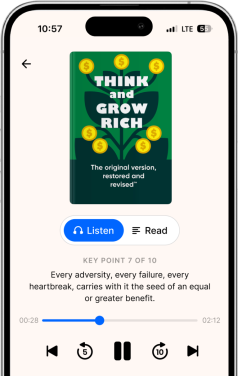
📘 This is exactly why over 55 million people use the Headway app instead. Get the key insights from the world's best nonfiction books in just 15 minutes — no pressure, no unused credits collecting dust.



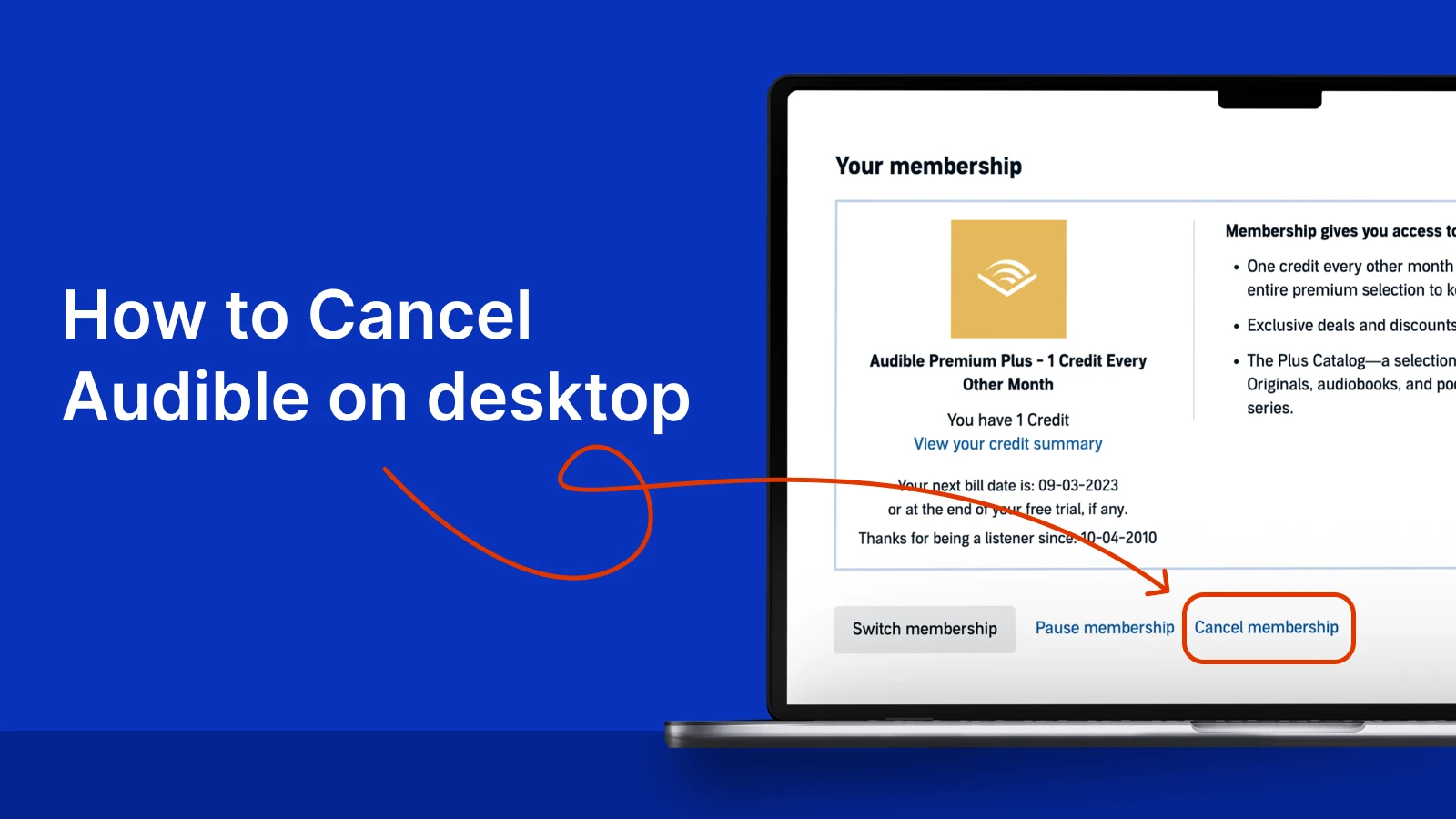
How to cancel Audible on desktop
This approach is the most straightforward.
Go to the Audible website and sign in with your Amazon account.
Select your username from the site's top navigation.
Click Account details.
Find and select the Cancel membership link.
You'll see a few screens asking you to confirm. Keep clicking Continue to cancel until you reach the confirmation page.
After you cancel, you'll receive an email confirmation. Your membership status on your account details page will also update to reflect the change.
How to cancel Audible membership on iPhone or Android
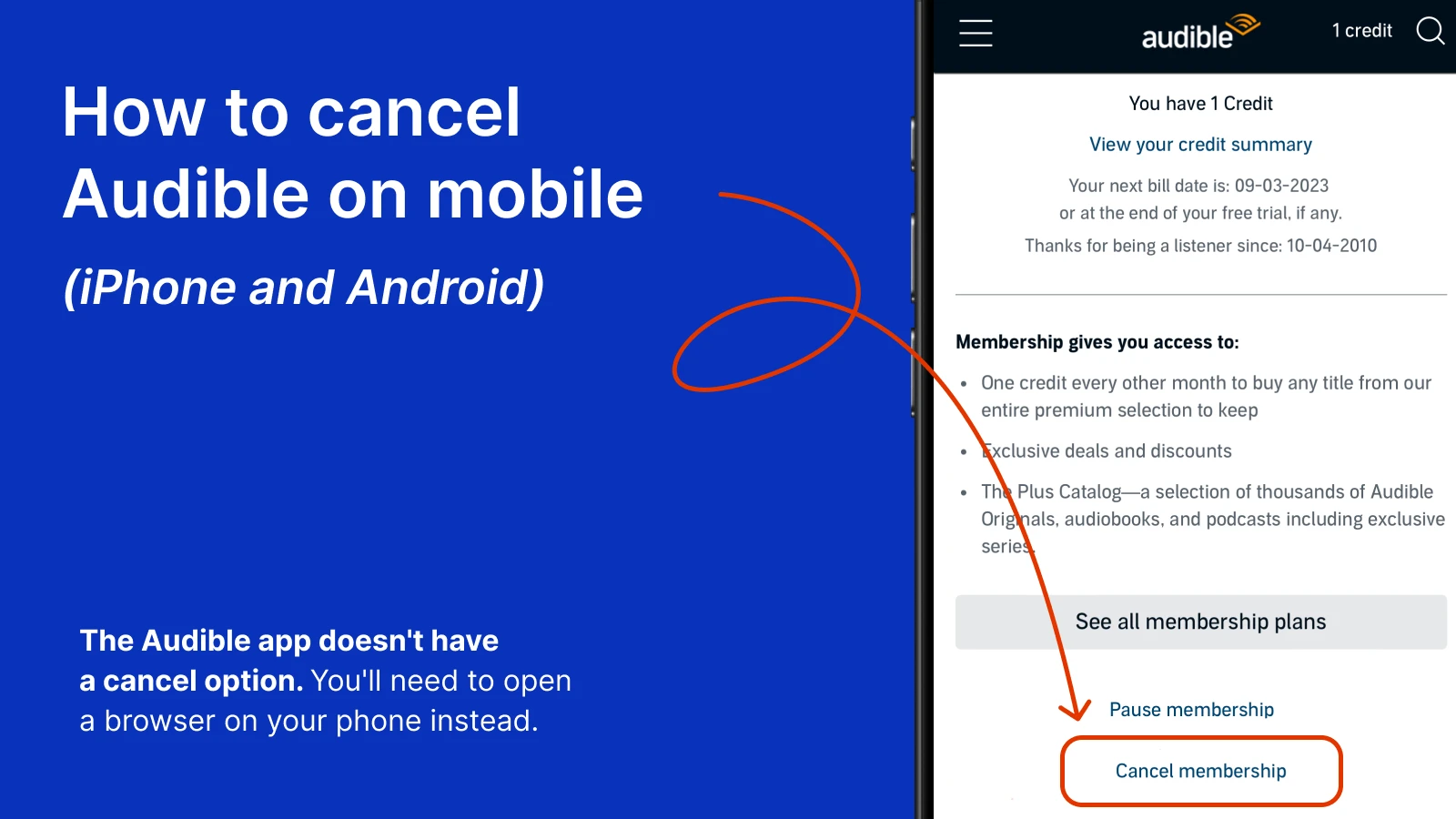
No wonder you're searching for how to cancel Audible membership on phone — this is where things get tricky. The Audible app doesn't have a cancel option. You'll need to open a browser on your phone instead.
Open Safari, Chrome, or another browser on your iPhone or Android device.
Go to the Audible website.
Tap the ≡ menu (hamburger button) in the corner.
Select your account.
Tap Cancel membership.
Confirm your cancellation.
You'll get an email once it's done.
How to cancel if you're billed through Apple or Google
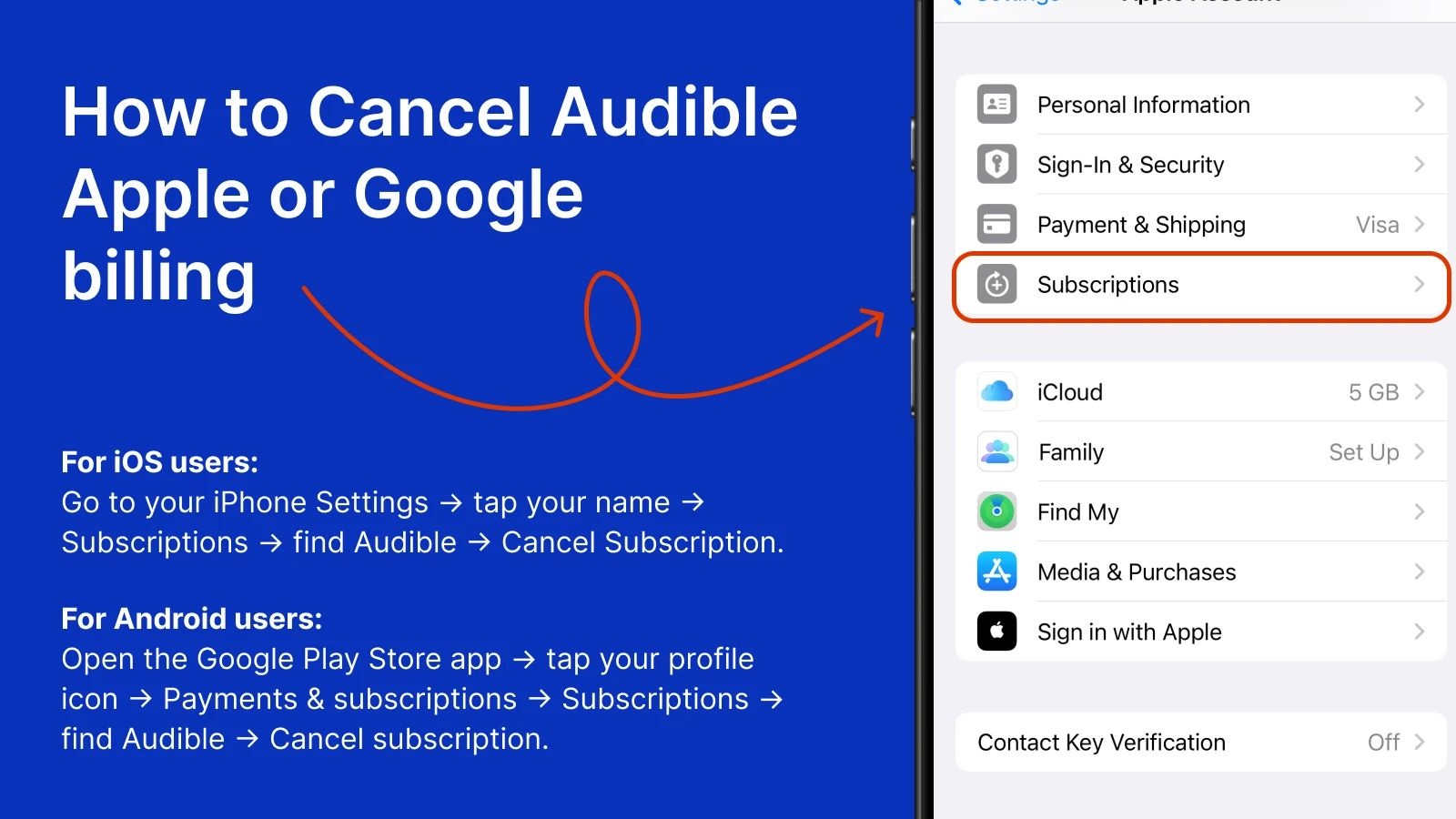
Did you sign up for Audible through the App Store or Google Play Store? If so, then you can't cancel on the Audible website at all. You'll need to manage your subscription directly through Apple or Google.
For iOS users: Go to your iPhone Settings → tap your name → Subscriptions → find Audible → Cancel Subscription.
For Android users: Open the Google Play Store app → tap your profile icon → Payments & subscriptions → Subscriptions → find Audible → Cancel subscription.
Troubleshooting: Can't find the cancel button?
If you're staring at your screen, wondering how to cancel Audible subscription and why there's no cancel option, here are the usual culprits:
You're using the Audible app. Switch to a browser. The app won't help you here.
You're on the mobile site. Try switching to "Desktop View" in your browser settings for better navigation.
You're billed through Apple or Google. Check your phone's subscription settings instead.
You already cancelled. Check your membership status on the account details page to confirm.
You have multiple accounts. Are you sure that you don't have multiple Audible accounts linked to the same Amazon account or to different email addresses?
Why people really cancel Audible membership (and what to do next)
Most people don't cancel because they hate audiobooks. They cancel because they hate the pressure of a 20-hour book they'll never finish.
So if you still want to keep learning but without the guilt of unfinished audiobooks, Headway might be a better fit. Here's how it compares:
| Audible | Headway |
|---|
Time commitment | 8–15 hours per book | 15 minutes per summary |
Monthly cost | ~$15/month for 1 credit | Affordable unlimited access |
Content type | Full audiobooks | Key insights from bestsellers |
Best for | Deep listening sessions | Busy schedules and daily learning |
Headway distills the world's best nonfiction books into bite-sized summaries that you can read or listen to during your commute, lunch break, or before bed. No pressure, no wasted credits — just growth at your own pace.
📘 Download Headway and turn your daily reading goal into something you'll actually stick with.
Frequently asked questions on how to cancel Audible membership
How do I cancel my Audible subscription?
Log in to the Audible website using a browser — not the app. Go to Account details from your username drop-down menu, then click Cancel membership. Confirm by selecting "Continue to cancel" until you see the final cancellation page. You'll receive an email confirmation that your membership status has changed. Remember that Audible is separate from your Amazon Prime subscription — cancelling one doesn't affect the other. The Audible app deliberately doesn't include cancellation options, forcing you to use the website. This is intentional design, not a bug.
Audible cancel membership: How does it work?
When you cancel, your membership remains active until the end of your current billing cycle. Audible cancel membership processes immediately in the system, but you keep all benefits including credits and Plus Catalog access until your paid period expires. After the billing cycle ends, you lose streaming access to the Plus Catalog, but any audiobooks you purchased with credits remain in your library permanently. You can listen to those purchased titles anytime, even years after cancellation. Your account itself stays active — you're not deleting it, just stopping the subscription.
How do I cancel Audible membership on my phone?
You cannot cancel through the Audible app on any device. Instead, open Safari, Chrome, or another mobile browser on your iPhone or Android device and navigate to audible.com. Tap the menu icon (three horizontal lines), select your account from the dropdown, then tap Cancel membership. Follow the prompts until you reach the confirmation screen. If you're billed through Apple's App Store or Google Play Store, you must cancel directly in your phone's subscription settings instead — the Audible website won't show a cancel option for those billing methods.
How to cancel Audible account permanently?
Cancelling your membership doesn't delete your account — it only stops future billing. To cancel Audible account entirely and remove all your data, you first need to end the membership through audible.com, then contact Audible customer support directly to request full account closure. You can reach them at +1 (888) 283-5051 or through their online contact form. Keep in mind that permanently closing your account removes access to all your purchased audiobooks forever. Make sure to download any titles you want to keep before requesting account deletion, as this action cannot be reversed.
Audible subscription cancel: Can I do it through the app?
No. Audible subscription cancel options don't exist anywhere in the mobile or desktop app interface. You must use a web browser to access the Audible website at audible.com. This applies whether you're using an iPhone, Android phone, iPad, or tablet. If you originally signed up through Apple's App Store or Google Play Store, you must cancel in your phone's subscription settings — the Audible website won't display a cancel option for App Store or Play Store billing. This is because Apple and Google control those subscription relationships directly.
How to cancel Amazon Audible if billed through Amazon?
If you signed up directly through Audible's website (which uses your Amazon account for login), go to audible.com in any web browser, click your username in the top navigation, select Account details from the dropdown menu, and click the Cancel membership link. How to cancel Amazon Audible works identically whether you're on desktop, mobile browser, iPhone, or Android — the key is using the website, never the app. Your Amazon account credentials will log you in automatically if you're already signed into Amazon services. The process takes about two minutes from start to finish.
How to cancel my Audible account step-by-step?
Log into audible.com using any web browser (Safari, Chrome, Firefox, Edge), click your username in the top-right corner, select Account details from the dropdown menu, then click the Cancel membership button. You'll see several screens asking you to confirm your decision — keep clicking "Continue to cancel" or similar prompts until you reach the final cancellation confirmation page. How to cancel my Audible account follows the same exact process whether you're using a Windows PC, Mac, iPhone browser, or Android browser. Just remember you cannot complete this process in the Audible mobile app.
Cancel my Audible subscription: What happens to my credits?
When you cancel my Audible subscription, any unused credits in your account will disappear at the end of your final billing cycle. Credits sitting unused won't survive cancellation — they're gone permanently once your membership officially ends. There's one important exception: if you signed up through Apple's App Store or Google Play Store, your credits don't expire and will remain in your account indefinitely, even after cancellation. This is a special provision for mobile app store subscriptions. Before canceling, consider using your credits on audiobooks you've been wanting, since purchased books stay in your library forever.
How to cancel my Audible subscription before renewal?
Cancel your subscription before your next billing date by logging into audible.com and going to Account details. Check your account details page after canceling to confirm your membership status clearly shows as "cancelled" with your end date displayed. Make sure to complete this process at least a day before your renewal date arrives to avoid being charged for another month. Contact Audible customer support online through their contact form or by phone at +1 (888) 283-5051 if you encounter any difficulties or if the cancellation doesn't process correctly. They can verify your cancellation status immediately.
Audible membership cancel: Will I lose my books?
No. Audible membership cancel only stops future billing — it doesn't remove your purchased audiobooks. Any audiobooks you bought with credits remain in your library permanently and you can listen to them anytime, even decades after canceling. However, you will immediately lose access to all Plus Catalog streaming titles, which are only available during active membership. Any unused credits in your account will also disappear when your membership period ends, unless you subscribed through Apple's App Store or Google Play Store. Download your favorite Plus Catalog titles before canceling if you want to finish them.
How to stop Audible membership from charging me?
Cancel before your next billing date by visiting audible.com, navigating to Account details, and clicking Cancel membership. How to stop Audible membership charges requires completing the full cancellation process before your renewal date arrives — if you cancel on the day you're billed, you may still be charged for that cycle. Your account dashboard will display your cancellation status with the exact date your membership ends. During this remaining paid period, you retain full access to all membership benefits including credits and the Plus Catalog. Set a calendar reminder to cancel a few days before renewal if you want to avoid any chance of additional charges.
How to cancel audiobooks subscription on iPhone?
If you subscribed through Apple's App Store, go to your iPhone Settings → tap your name at the top → Subscriptions → find Audible in the list → tap Cancel Subscription. If you subscribed directly through Audible's website, you cannot cancel in iPhone settings — instead, open Safari or any browser and go to audible.com to cancel there. How to cancel audiobooks subscription depends entirely on where you originally signed up. Check your email receipt from when you first subscribed to determine whether Apple or Audible billed you. App Store subscriptions say "Apple" on the receipt.
Cancel audiobook subscription: Do I get a refund?
Cancel audiobook subscription doesn't automatically trigger any refunds. Audible Inc. doesn't refund membership fees when you voluntarily cancel your subscription. Your membership remains active until the end of your current paid billing cycle, which is what you already paid for. If you believe you qualify for a refund due to unauthorized charges, technical issues, or other special circumstances, contact Audible customer support directly through their website contact form or by calling +1 (888) 283-5051. Refund policies vary significantly based on your specific situation, how recently you were charged, and your account history with Audible.
How to cancel your Audible subscription if you have multiple accounts?
Check all email addresses that might be linked to your Amazon account or payment method. Many people accidentally create multiple Audible memberships under different email addresses and forget about them. Log into each separate Amazon account individually, then navigate to audible.com to cancel each membership one by one. How to cancel your Audible subscription becomes more complicated with multiple accounts because each requires separate cancellation. Review your credit card or bank statements to identify how many active Audible charges you're receiving monthly. Contact Audible support if you're unsure which email addresses have active memberships — they can search by your payment information.
Audible cancel account: Is it different from cancelling membership?
Yes. Audible cancel account means permanently deleting your entire account and all associated data, while cancelling membership simply stops your monthly subscription billing. To fully close your account forever, first cancel the membership at audible.com, then contact Audible customer support requesting complete account deletion and data removal. This permanently removes all your data, account information, and access to every audiobook you've purchased — even the ones you bought with credits. There's no recovery option once the account is deleted. Download any audiobooks you want to archive before requesting permanent account deletion, because you'll lose access to everything immediately.
How do I cancel Audible subscription if billed through Google Play?
Open the Google Play Store app on your Android device, tap your profile icon in the top-right corner, select Payments & subscriptions from the menu, then tap Subscriptions, find Audible in your active subscriptions list, and select Cancel subscription. How do I cancel Audible subscription through Google Play requires using the Play Store app, not the Audible website or Audible app. Google manages all subscriptions purchased through their store directly, so Audible doesn't have access to cancel them. After canceling, you'll receive a confirmation email from Google. Your subscription remains active until the current billing period ends.
How to cancel Audible free trial before being charged?
Cancel Audible trial the same way you'd cancel a regular paid membership — go to audible.com, click Account details, and select Cancel membership. Complete this process before your trial period expires to avoid being automatically charged for a full membership. You'll retain full access to all trial benefits until the trial officially expires, but no payment will process when that date arrives. Cancel Audible free trial immediately after signing up if you only want the free promotional audiobooks without continuing to paid membership. The books you selected during your trial remain in your library forever, even after cancellation.
How do I cancel my Audible account completely?
First cancel the active membership by logging into audible.com and going to Account details, then contact Audible customer support to request permanent account deletion. How do I cancel my Audible account fully requires completing both steps — membership cancellation alone doesn't delete your account. Call support at +1 (888) 283-5051 or use their online contact form to request deletion. Remember that permanent account deletion removes access to all purchased audiobooks forever, including titles you bought with credits. Back up or download anything you want to keep before requesting account closure, as this action is irreversible and Audible cannot restore deleted accounts.
If I cancel my Audible subscription, what happens?
Your membership stays active until the end of your current billing cycle. If I cancel my Audible subscription, I keep all credits and Plus Catalog access until the paid period expires. After your membership officially ends, you lose streaming access to the entire Plus Catalog immediately, but all audiobooks you purchased with credits remain in your library permanently. Any unused credits sitting in your account will vanish when the membership ends, unless you subscribed through Apple's App Store or Google Play Store. You can rejoin Audible anytime in the future and your previously purchased audiobooks will still be there waiting for you.
Manage Audible subscription: Where do I find settings?
Log into audible.com using a web browser (never the app), click your username in the top navigation bar, then select Account details from the dropdown menu. Here you can manage Audible subscription settings including your payment method, membership plan type, billing history, and subscription cancellation. The Audible mobile app deliberately doesn't offer any subscription management features — all account changes, upgrades, downgrades, and cancellations must be completed through the website. You can also view your credit balance, remaining membership days, and next billing date in the Account details section. Mobile browser access works identically to desktop.
Cancelling Audible: Will I lose everything?
No. Cancelling Audible only stops future monthly billing — you don't lose your purchased content. You permanently keep any audiobooks you bought with credits or purchased directly, and you can listen to them anytime forever. You will lose immediate access to all Plus Catalog streaming titles the moment your paid membership period ends, and any unused credits in your account will disappear at that time (except for App Store and Google Play subscriptions where credits never expire). Your account itself stays active with your purchased library intact. You can rejoin Audible anytime and all your old purchases will still be available.
Cancel Amazon Audible: Does it affect my Amazon account?
No. Cancel Amazon Audible doesn't impact your regular Amazon.com shopping account, Prime membership, Prime Video, Kindle Unlimited, or any other Amazon services. They're all billed separately and operate independently. Cancelling your Audible audiobook subscription only ends that specific service. Your Amazon account login credentials work across all Amazon services, which sometimes confuses people into thinking they're the same subscription. They're connected for convenience (single sign-on, shared payment methods, unified account management) but completely independent for billing purposes. Your Amazon shopping history, Prime benefits, and other services continue normally after canceling Audible.