Self-growth
 Apps & Digital Tools
 Business & Career
 Success
 Growth Tools
 Psychology
 Communication
 Relationships

Do you highlight passages in books but never actually look at them again? If you want to remember more from what you read, Readwise offers a specific system to keep those ideas fresh in your mind.
This review will break down exactly what this platform is, how it works, and what it costs. We'll look closely at its strengths, its limitations, and who should actually spend money on it. You'll also learn more about alternatives if you find complex note-taking systems too overwhelming.
If you’ve been meaning to grow and improve but never find the right moment for it, Headway can help you start now. No pressure, no guilt, just small steps that stack into real change.
Try Headway to fit daily growth into your schedule.

Quick summary
Readwise is a reading retention platform that imports highlights and resurfaces them through daily review.
Readwise Reader adds a read-it-later layer for articles, newsletters, PDFs, EPUBs, and more.
Readwise is best for heavy readers, researchers, and knowledge workers who actually revisit notes.
The main downside is complexity and cost if you only want simple reading or casual bookmarking.
Headway is a stronger alternative for people who want a lighter daily learning habit built around bite-sized nonfiction insights.
What is Readwise, and what does it actually do?
Understanding this tool starts with looking at your current reading habits. We often consume information quickly without a clear plan to retain it.
Readwise is a software service that gathers all your reading notes in one place and helps you review them regularly.
Here is how it works at a high level:
You connect your reading accounts to the platform.
The app automatically pulls all your saved quotes and notes into one central database.
It sends you a daily email or app notification with a few random highlights.
You review these short text snippets to keep the ideas fresh.
Your notes sync directly to your favorite note-taking app.
📘 Find the perfect reading companion for your budget with Headway!
The difference between Readwise and Readwise reader
Many new users feel confused when they sign up and see two different names. They are part of the same company but serve very different purposes. Let's break down exactly what each one does.
| Feature | Readwise | Readwise Reader |
|---|---|---|
Main purpose | Readwise highlights | Reading new content |
Content type | Short quotes and notes | Full articles, PDFs, epubs |
Action | Daily review | Reading and highlighting |
Ideal use | Remembering past reading | Managing a reading list |
Cost | Included in Lite or Full | Included only in the full tier |
Readwise acts as the storage and review system for things you have already finished reading. The reader app is your reading inbox where you consume new things. You can use one without the other, but they work best together.
Why people confuse the same products
It's easy to mix up the two tools because they share the same brand name and subscription plan. The company built the original app first, then added the second app years later.
Readwise functions as a highlight review and retention system. It sits in the background, collecting data and feeding it back to you. It is a tool for memory.
Reader is the actual reading inbox and annotation environment. It replaces apps where you save links to read later. When you highlight a sentence in Reader, that sentence automatically moves into your main review system.
They share a single database and a connected workflow. This distinction matters greatly when evaluating the app. You need to know if you are paying for a memory tool, a reading tool, or both.
📘 Compare reading tools that actually fit busy schedules with Headway!
Readwise vs Readwise Reader: Which part do you need?
You don't have to use every feature a company offers to get value out of it. Many users pay for the full tier but only use half the product. This breakdown helps you decide which side of the platform actually matches your workflow.
| Your primary goal | What you actually need | Why this makes sense |
|---|---|---|
Remember book highlights
| Readwise core | You only need to store and review notes from physical books and digital devices. |
Read articles later | Readwise Reader | You need a clean inbox for long web articles, newsletters, and EPUBs. |
Read and retain in one place | The full ecosystem | You want a unified system to read new content and review old notes together. |
Build a simple learning habit | A lighter alternative | You want fast takeaways and daily motivation without managing a complex digital database. |
Why Readwise became so popular with serious readers
People who read constantly often hit a wall where they can no longer remember the books they finished last month. This tool gained traction because it addressed that specific frustration.
Instead of leaving your notes trapped in a digital book, it forces those notes out into the open. It turns passive reading into an active review habit.
It also fits perfectly into complex note-taking and personal knowledge workflows. Users can connect it to Notion, Obsidian, Roam, and Evernote. Every time you highlight something, it automatically appears in your personal workspace.
It now reaches far beyond just books. You can use it to save quotes from articles, newsletters, PDFs, and even YouTube videos. If you want to check whether a specific audio tool is right for your habits, you might want to read whether Audible is worth it.
📘 Discover smarter alternatives to pricey subscriptions with Headway!
Readwise features that matter most in everyday use
Software tools often advertise dozens of options you'll most likely never actually touch. We touched on the specific functions that most impact your daily routine. Here is a breakdown of what you will actually use.
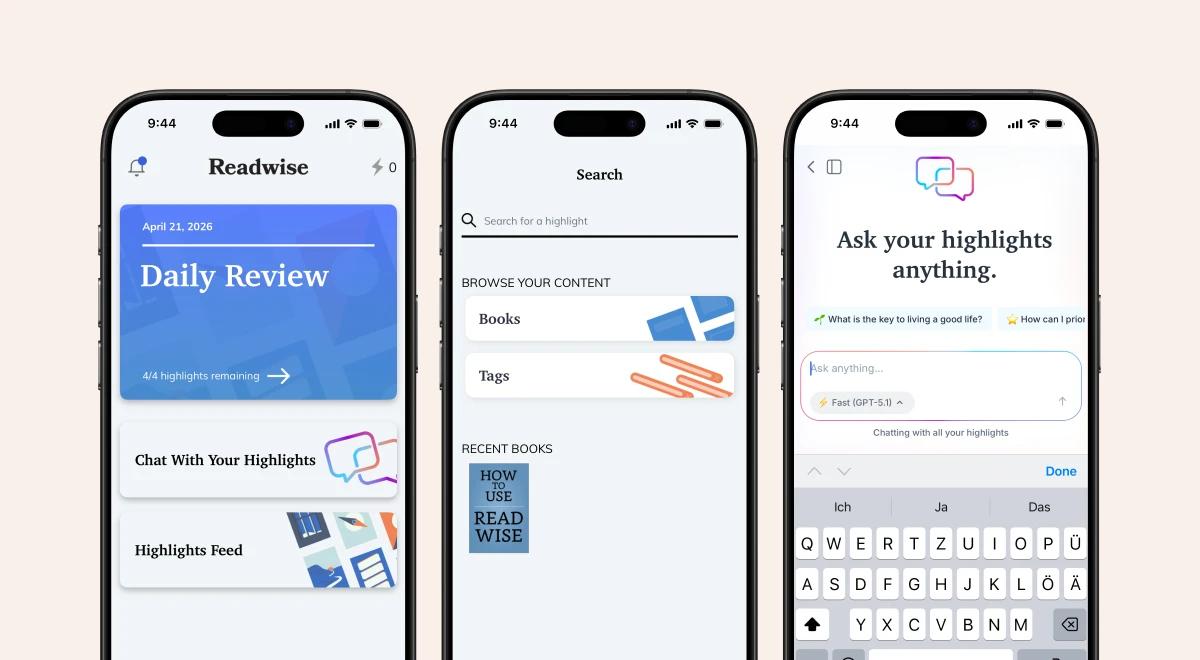
Track books and review highlights — get key insights for growth.
Highlight importing: It pulls notes directly from your Kindle, Apple Books, Kobo, and Instapaper. This matters because it puts all your knowledge in one place. Heavy readers benefit the most, though connecting all your accounts takes some initial setup.
Daily review and spaced repetition: The app sends you a daily email or notification with past highlights. This strengthens your retention over time. Students and researchers get a lot out of this, but casual readers might start ignoring the emails after a few weeks.
Tags, notes, and search: You can organize your highlights and add your own thoughts to them. This matters when you need to find specific quotes for essays or reports. The main limitation is that tagging requires consistent manual effort to stay organized.
Flashcards and active recall: You can hide words in your highlights to test your memory. This turns passive reading into active studying. Students preparing for exams benefit here, but it can feel like too much work for casual reading.
Reader app workflow: It lets you save web articles from your browser extension. This matters for people who hoard open browser tabs. Commuters and researchers benefit, but your inbox can quickly become cluttered if you save too much.
Text-to-speech and audio: You can listen to saved articles while you walk or drive. This matters because it turns idle time into learning time. Commuters benefit heavily, but computer-generated voices can sometimes sound a bit robotic.
AI document chat: The ghostreader tool lets you ask questions about a specific document. This helps when you review dense academic papers docs. The feature is useful, but AI summaries sometimes miss an author's human tone.
Integrations and API access: You can sync your data directly into an Obsidian vault or export it as a CSV. This matters because it connects your reading to your main workspace. Programmers and writers benefit, but standard users will rarely touch these settings.
A good alternative for tracking your reading habits visually is the Bookmory review breakdown.
📘 Make every reading minute count with Headway!


What is Readwise like to use day to day?
Features look good on paper, but a tool only works if it fits your daily routine. Setting up a new software habit takes patience.
Setting it up for the first time takes about twenty minutes. You log into readwise.io and authorize your accounts. Importing your first highlights feels very rewarding. Seeing years of Kindle notes appear in one place is a great moment.
Building a daily review routine takes discipline. On a typical day, you open the mobile app and swipe through five or six quotes. You might add a tag or discard a quote you no longer care about.
Managing a growing library without overwhelm is the biggest challenge. The app feels incredibly powerful when you need to find a specific quote for an essay. But for a casual reader, the app can feel heavy or overbuilt if you fall behind on your reviews.
Readwise pricing explained without the fluff
Money is often the deciding factor when choosing a new digital tool. Subscriptions add up quickly over a year. Here's a detailed breakdown of Readwise pricing and subscription plans.
| Plan tier | Monthly cost (billed annually) | Key features included |
|---|---|---|
Readwise Lite | $4.49 per month | Daily review, syncing, basic organization |
Readwise Full | $9.99 per month | Reader app, Notion/Obsidian exports, early access |
The lite plan covers the basics of memory retention, but the full plan is where the real value lives. The Reader app is only included in the full tier. Cost framing versus value received depends entirely on your reading volume.
If you read one book a month, ten dollars might feel expensive. If you read two books a week, it is a bargain. If you are comparing subscription costs for book apps, looking at whether Blinkist is worth it can give you a good baseline for audio summaries.
📘 Get book insights without the highlight hassle on Headway!
Readwise pros and cons at a glance
Every software product has specific strengths and glaring weaknesses. It helps to see them listed out clearly before you enter your credit card details.
Readwise pros
Excellent for centralizing highlights from dozens of different sources.
Excellent for keeping old ideas fresh through spaced repetition.
Excellent for exporting clean text into a note-taking app.
Excellent for reading multiple formats in one place.
Readwise cons
Less ideal for readers who never take notes to begin with.
Less ideal for people on a strict budget, as the full price is high.
Less ideal for casual readers who just want a basic read-it-later app.
Less ideal if you want motivation more than you want storage.
Who Readwise is best for and who should skip it
No app is perfect for every single person. Finding the right tool means understanding your own specific needs.
It is a perfect fit for researchers, writers, and heavy readers. It is a good fit for people with a strong, existing personal knowledge system. If you spend hours in Apple Notes or a similar tool, this will save you time.
It isn't ideal for casual readers who read fiction for fun. It isn't ideal if you never revisit highlights and just want to enjoy a good story. It isn't ideal if you prioritize motivation over storage.
📘 Skip the sync issues. Read seamlessly with Headway!
What real users say: Readwise reviews from Reddit
When deciding if a tool fits your routine, reading what actual paying subscribers say is incredibly helpful. On Reddit, heavy readers frequently discuss their daily workflows and how this platform fits into them.
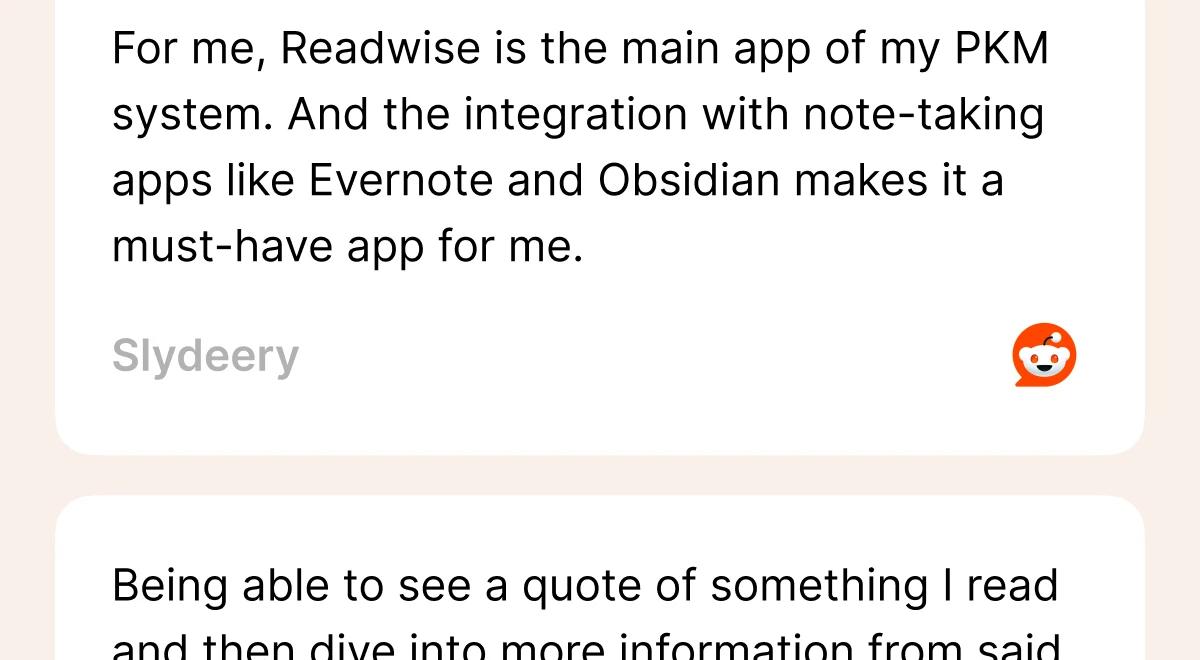
Users value managing knowledge — build daily habits for self-improvement.
A user named Slydeery shared their exact setup on the Readwise subreddit, noting how it connects everything:
"For me, Readwise is the main app of my PKM system. And the integration with note-taking apps like Evernote and Obsidian makes it a must-have app for me."
Another user, Apprehensive-Set9483, highlighted the memory benefits in the same thread, stating:
"Being able to see a quote of something I read and then dive into more information from said source. It's just invaluable and lets me re-experience what I have read over and over again."
These user experiences show that the platform truly shines when it is heavily integrated into a broader personal database.
How Readwise handles physical books
If you prefer physical books, you might feel left out of the digital note-taking world. But the Readwise app has a specific feature for paper readers. You do not need to manually type out every single sentence you want to remember.
The mobile app includes a built-in camera scanner. You simply open the app, point your phone at the page, and take a photo.
The optical character recognition scans the text instantly.
You use your finger to highlight the exact sentences you want to save.
The text is converted digitally and dropped right into your main database.
This feature saves students and readers who love the feel of paper a massive amount of time. It bridges the gap between your physical library and your digital notes, making sure no good idea gets left behind on a physical page.
📘 Access curated wisdom instantly without setup with Headway!
Podcast integrations for audio learners
Many people consume their daily information through podcasts rather than text. The Readwise platform connects beautifully with specialized podcast players to capture audio insights.
You can connect apps like Snipd or Airr directly to your account.
When you hear something interesting in a podcast, you tap your headphones.
The app captures the audio transcript of that exact moment.
That transcript automatically syncs into your central highlights database.
If you watch YouTube videos, the Reader app can process their transcripts. You can highlight text from the video transcript just like a written article. This opens up entirely new ways to learn. You no longer have to stop driving or running to write down a profound thought from your favorite podcast host.
Customizing your daily email reviews
A daily review system only works if it shows you information you actually care about. If the algorithm feeds you boring quotes, you will quickly ignore the daily email.
The platform gives you deep control over what resurfaces in your feed, so you never get bored.
You can tune the frequency to see more recent quotes or older ones.
You can tell the app to show fewer highlights from a specific book.
You can set up themed reviews to focus on a single topic, such as psychology.
This customization is vital for long-term retention. If you have a thousand highlights, you need the algorithm to prioritize the ones that matter most. Adjusting these settings keeps the review process fresh and engaging, rather than letting it become another annoying chore in your inbox.
📘 Get organized insights from day one with Headway!
Data privacy and exporting your highlights
When you spend years building a database of notes, you need to know your information is safe. Trusting a software company with your entire reading history is a big commitment.
Fortunately, the platform strongly supports data ownership.
You can export your entire library at any time as a simple CSV file.
You can download everything in markdown format for local storage.
If you cancel your subscription, your data is never held hostage.
The ability to sync everything to Apple Notes or Obsidian means you always have a local backup. You are never locked into the platform. If the company were to close down tomorrow, your highlights would still exist safely on your hard drive. This peace of mind is crucial for serious writers and researchers.
Sharing your best highlights on social media
Sometimes you read a sentence so good you immediately want to share it with your friends. The app makes sharing your favorite quotes simple and visually appealing.
Instead of just copying and pasting plain text, the app can generate styled images.
You pick a highlight from your database.
The app turns it into a clean, formatted graphic.
You can post this image directly to Twitter, Instagram, or Facebook.
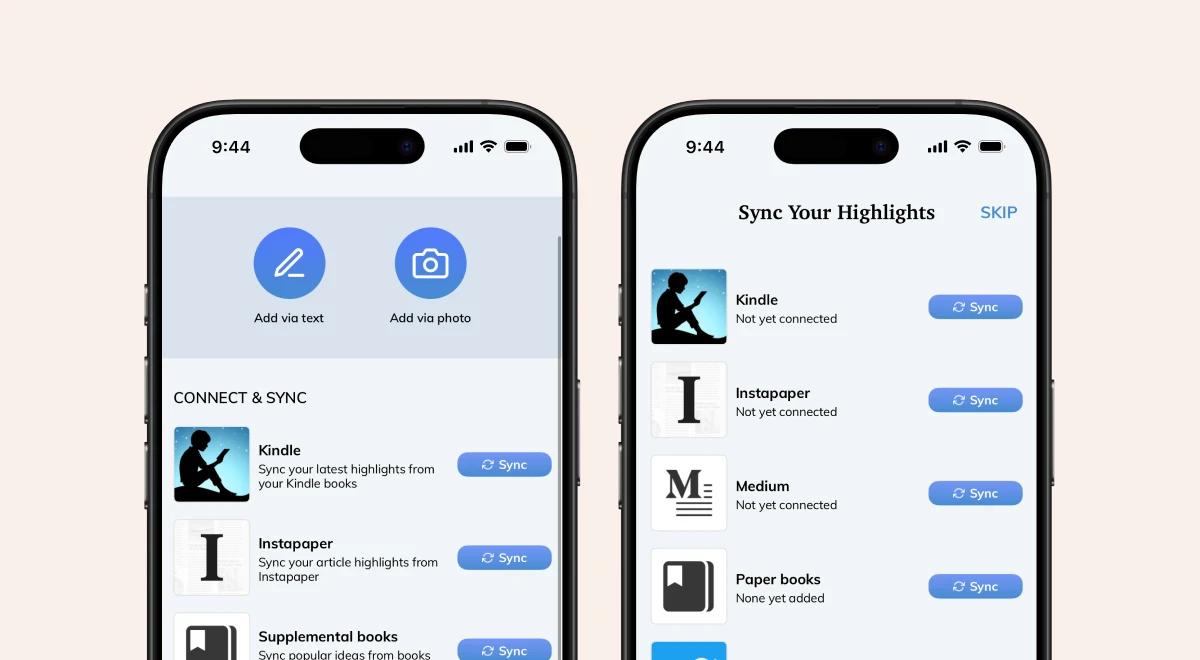
Sync your reading highlights — get practical insights for growth.
This feature is great for content creators or anyone who runs a reading-focused account. It saves you from opening a separate design tool just to format a quote. It turns your private reading habit into something you can easily discuss with your community online, sparking useful dialogue about the books you love.
📘 Save hours of manual highlighting with Headway!
How to get the most out of Readwise without feeling overwhelmed
A new tool can easily become too much to handle if you try to use every feature on the first day. This is why many people quit after a week. Here is how to keep things simple.
Start with a single source: connect your Kindle or reader app, but don't connect both right away. Wait until you get used to the daily flow.
Limit your daily review count: Set the app to show you 50 quotes a day to avoid exhaustion. Stick to five or ten quotes to start.
Use tags sparingly: you don't need one for every topic. Create a few broad categories and ignore the rest.
Build a five-minute daily routine: Check your review feed while waiting for your morning coffee. Don't treat it like a serious study session.
How Readwise fits into a personal knowledge management (PKM) system
If you use a tool like Obsidian or Notion, you probably have a personal knowledge system. This platform acts as the entry point for that entire system.
A good knowledge workflow has three parts: an input, a processing area, and an output. Readwise acts entirely as the capture and resurfacing layer. It grabs your notes from a physical book or a digital article and moves them into your workspace.
The integration with note-taking tools happens quietly in the background. Every morning, your new highlights simply appear in your Obsidian vault.
However, building a complex PKM system becomes overkill if you only read for fun. If you don't plan to write articles or create reports, sending hundreds of quotes to a Notion database will just create digital clutter.
📘 Get premium insights without premium prices on Headway!
Can Readwise actually help you remember more?
The core promise of the platform is that you will stop forgetting the books you read. But a software app can't force your brain to remember things automatically.
Spaced repetition is the main engine here. The app shows you an idea today, then a week later, then a month later. This repeated exposure forces your memory to hold onto the information.
Active recall also plays a role. If you use the flashcards feature to test yourself, you practice pulling the answer out of your head. This works much better than passive reading.
But highlights alone don't guarantee retention. If you mindlessly swipe past your daily email without actually thinking about the words, you will still forget everything. It only works if you slow down and actively engage with the material during your review.
Readwise for different types of readers: Which one are you?
Personalizing your setup depends entirely on how your brain already works. Finding your specific reading style helps you determine whether this tool will actually help you.
The binge reader: You read three books a weekend. You need the app to slow you down and remind you of what you read last month.
The slow learner: You read ten pages a day. You will love the active recall features for studying an author's exact arguments.
The researcher: You read for work. You mostly need the app to export quotes into your writing software.
The casual reader: You read fiction to relax. You should probably skip this app entirely.
The hoarder: You save everything but read nothing. You should stop adding new articles to the app and focus strictly on the daily review.
📘 Try before you buy, start free with Headway!
Common mistakes people make when using Readwise
Even great software becomes useless if you use it poorly. Many readers fall into the same traps when they start using a reading app. Avoiding these errors saves you a lot of frustration.
Over-highlighting everything: If you highlight an entire page, you aren't picking out the best parts. Stick to one or two sentences per chapter.
Never reviewing your highlights: Collecting notes without reading them completely ruins the point of the app.
Over-tagging and over-organizing: Spending more time sorting your notes than actually reading them is a massive trap.
Treating it like a storage system: It is a learning tool, not a digital closet. If you just want to store files, use a plain folder on your computer instead.
Readwise vs other apps: Where it wins and where it falls short
The market is full of apps trying to manage your reading life. Comparing them directly helps highlight their true differences.

Maximize your digital reading life — build daily habits easily.
Readwise vs Instapaper
Instapaper is a classic read-it-later app for saving web pages. Instapaper wins on simplicity and a clean reading interface. Readwise wins hands down in highlight export and retention features. A casual reader should choose Instapaper.
Readwise vs Matter
Matter focuses heavily on high-quality curation and audio listening. Matter wins on finding new things to read. Readwise wins by organizing what you've already read. If you want a better reading inbox, Matter is a strong option.
Readwise vs Raindrop.io
Raindrop is a bookmark manager for visual thinkers. Raindrop wins on saving links, images, and visual inspiration. Readwise wins on text highlighting and spaced repetition. A designer might prefer Raindrop.
Readwise vs Feedly or RSS-centered tools
Feedly is a pure RSS reader for following specific blogs. Feedly wins on processing hundreds of news headlines quickly. Readwise wins on deep reading and annotation. News junkies should stick to Feedly.
Readwise vs Headway for daily self-growth learning
Readwise helps you revisit what you have already read. Headway helps you build a consistent learning habit through bite-sized book summaries and podcast-like audio excerpts from non-fiction bestsellers.
Readwise is stronger for archives and annotations. Headway is stronger for guided daily learning and personalized summary playlists. To see how Headway compares to other summary apps, check out this comparison of Headway vs Blinkist guide.
📘 Stop overpaying for reading tools, choose Headway!
The hidden question behind Readwise: Do you need a knowledge system or a learning habit?
Many people buy productivity tools hoping the tool will fix their habits. But storing information is different from actually using it.
Collecting isn't the same as learning. You can save a thousand Tweets and never change your behavior. We often feel productive just because we clicked a save button on a browser extension.
Why do some readers over-save and under-use highlights? They want the feeling of knowledge without the hard work of practice. A massive database of quotes can sometimes feel like a digital graveyard.
When a lighter app leads to better consistency, you actually grow more. If your goal is personal development, you need momentum. If you want to explore more visual learning tools, you might find the Imprint app review helpful.
How Headway fits in if Readwise feels too complex
Sometimes you start using a tool and realize it requires too much daily maintenance. If you feel overwhelmed by tags and exports, you have other options.
When Headway is the better alternative, it is usually because the user wants immediate takeaways. Headway provides the core ideas of a book in fifteen minutes. You don't have to read a four-hundred-page book just to find the best highlights.
Who should choose Headway over Readwise? Anyone who wants to learn daily without building a complex workflow. It is perfect for people who want motivation, momentum, and direction for self-growth.
How Headway helps turn reading into a daily self-growth ritual is through its format. Why bite-sized summaries can be a better starting point than a full highlight system is simple: they fit into busy schedules. If you are comparing audio summary apps, this Bookey app review offers another perspective.
📘 Get better ROI on your learning with Headway!

How to decide if Readwise is worth it for you
Making a final decision comes down to being honest about your current habits. Don't buy a tool for the person you wish you were. Buy it for the person you are today.
Ask yourself how much you actually read in a given month. Ask yourself whether you revisit notes right now, or if you just want to start. Ask yourself whether you want curation, retention, or personal transformation.
Choose the simplest tool that matches your real habit.
Choose Readwise if you take detailed notes and want to remember them forever.
Choose Reader if you need a powerful inbox for long web articles and EPUBs on your iPhone.
Choose Headway if you want quick, daily self-growth through audio and text summaries.
Skip all of them if you are perfectly happy reading paper books without taking any notes.
📘 Invest in knowledge, not complicated systems with Headway!
Try Headway and turn your reading habit into daily growth
Readwise is a highly effective platform for people who treat reading as a serious research project. It centralizes your notes, connects to your web app workspace, and uses spaced repetition to fight forgetfulness. If you are a writer, student, or power reader, the subscription price is entirely justified by the time it saves you.
However, the main caveat is that it requires consistent effort to maintain. If you just want to improve yourself and learn new concepts quickly, building a database of quotes might slow you down.
Headway offers a much simpler alternative by focusing entirely on habit-building and practical takeaways. You get the big ideas from bestselling books without the pressure of managing a digital library.
Instead of organizing old notes, you can spend fifteen minutes a day actually learning something new. Headway provides audio and text summaries that fit perfectly into a morning commute or a lunch break.
Download the Headway app today to boost your personal development, build a consistent learning routine, and get the insights you need without the complex setup.
FAQs
Is Readwise worth paying for?
It is highly valuable if you actively highlight books and articles. The cost makes sense for researchers, writers, and heavy readers who need a reliable way to organize and review their notes. For casual readers who rarely revisit their highlights, the annual subscription might be too expensive.
What is the difference between Readwise and Readwise Reader?
Readwise is the core database tool that collects your highlights and sends you daily reviews to improve your memory. Readwise Reader is a separate reading app included in the full subscription. You use Reader to save and consume web articles, PDFs, and newsletters in one unified inbox.
Does Readwise work with Kindle?
Yes, it connects directly to your Amazon account. It automatically imports all your highlights and notes from your digital books. You can sync these notes to your preferred note-taking app. This makes it incredibly easy to pull quotes from books you have recently finished reading.
Is Readwise good for students and researchers?
It is extremely useful for academic work. Students can organize quotes using tags and export them into documents. The spaced repetition and flashcard features also help with exam preparation. It keeps all research materials neatly organized and searchable in a single central digital location.
Is there a free version of Readwise?
There is no permanent free tier. The company offers a free trial so you can test the functionality. After the trial, you must choose either the Lite or Full tier as a paying subscriber. Students and educators can apply for a specific discount on the official website.
What is the best alternative to Readwise?
If you want a simple read-it-later app, Instapaper and Pocket are great free options. If you want a visual bookmarking tool, Raindrop is excellent. If you want to build a daily habit of learning from nonfiction books rather than just storing quotes, Headway is the strongest alternative.
Is Headway a good alternative to Readwise?
Yes, if your goal is self-growth rather than data storage. While the Readwise app focuses on helping you remember things you have already read, the Headway app gives you bite-sized summaries of new books. It is perfect for busy people who want daily insights without managing a complex system.