Self-growth
 Apps & Digital Tools
 Business & Career
 Success
 Growth Tools
 Psychology
 Communication
 Relationships

The TalentLMS 2026 L&D report found that 65% of employees say performance expectations rose this year, while lack of time remained the biggest barrier to learning.
A catalog holding thousands of training modules does not fix a time problem, and that tension sits behind every honest LinkedIn Learning review. LinkedIn Learning is an online professional development platform built specifically for workplace skills, offering quick answers and structured pathways for busy professionals.
If you want to stay relevant in today's job market, online education is basically mandatory. You have to continually build new skills just to keep pace with changing software and management strategies.
But with dozens of platforms fighting for your attention, paying for another monthly subscription requires a hard look at the actual value provided.
This article breaks down exactly what the platform offers, what the subscription costs, how the completion certificates work, and whether the learning experience actually translates into real career momentum.
📘 Seeking more quick insights on your career growth? Try Headway and access the growth and career summaries of the famous nonfiction titles.

Quick summary: LinkedIn Learning at a glance
LinkedIn Learning is a workplace skills platform with video courses.
Courses run about 2 to 4 hours and are split into short lessons.
Certificates show on your LinkedIn profile but carry no university endorsement.
Many employers and schools give free access, so check before paying.
Technical depth is thin, and course quality varies by instructor.
LinkedIn learning courses and the overall learning experience
The sheer volume of video content on this platform is staggering. While they previously advertised over 24,800 courses for various user groups, current numbers show that LinkedIn Learning offers over 26,400 courses globally.
These classes are taught by over 3,900 industry experts who bring real-world expertise directly to your screen. The broad range of topics covered breaks down into three main categories: business topics, technology, and creative fields.
When you dive into the user interface, the setup is highly intuitive. A smart search bar and AI-powered course recommendations help you discover exactly what you need without wasting time.
Rather than sitting through massive college lectures, courses are structured into bite-sized video lessons for incremental learning. A typical class runs for 2 to 4 hours, heavily focused on practical skills you can apply immediately.
If you want to compare how this approach stacks up against celebrity-led instruction, reading a MasterClass vs Coursera breakdown highlights how different platforms structure their online courses.
To ensure you actually retain the knowledge, the platform provides 300,000 quiz questions for reinforcement. Most technical and creative specific courses include robust supplemental materials.
You get access to 10,000 exercise files for hands-on practice, allowing you to follow along with the instructor step-by-step. For developers, the platform even integrates virtual coding environments like GitHub Codespaces so you can write code directly in your browser.
The platform supports a truly global audience. Courses are available in seven languages with subtitles in 46 languages. In some specific regions, LinkedIn Learning supports 20+ languages for subtitles depending on the localized content strategy.
To keep the learning experience fresh, the company adds new content weekly, enhancing course variety so professionals can stay on top of rapid industry changes.
If you are not sure where to start, you can explore over 1,300 hand-curated learning pathways. These learning paths guide users through course sequences tailored to career goals.
Whether you want to transition into leadership or learn a new programming language, the platform removes the guesswork out of which classes to take next.
📘 Looking for a faster way to absorb professional knowledge? Get the Headway app to read or listen to 15-minute book summaries between your meetings.

Tired of corporate training that doesn't stick?
Headway builds career skills into daily streaks you keep.
Read career summariesCompletion certificates and your LinkedIn profile
Finishing a class feels great, but leveraging that completion for career growth is why most people use this service. LinkedIn Learning provides over 2,000 courses for certification preparation.
They have actively partnered with 34 organizations for certification exam prep, including heavyweights like the Project Management Institute. In total, the platform supports over 120 off-platform credentials and professional certifications.
When you finish a course, you receive a digital badge. LinkedIn Learning certificates are displayed on your LinkedIn profile automatically, showing your network that you take your personal development seriously.
You can quickly write a post to share your new expertise with your peers and clients. These certificates indicate completion of professionally designed courses, and some LinkedIn Learning courses offer Continuing Education Units (CEUs), which are highly valuable for specific licensed careers.
However, it is crucial to manage your expectations. Certificates are not endorsed by universities or colleges. They prove that you watched the videos and passed the basic quizzes, but they do not carry the same academic weight as a formal degree.
If you are comparing digital credentials and wondering is MasterClass worth it for your resume, keep in mind that employers value these badges as proof of initiative rather than formal academic mastery.
Professionals can earn continuing education units through LinkedIn Learning courses, making the platform highly practical for maintaining existing credentials.
LinkedIn Learning cost and subscription plans
Figuring out the LinkedIn Learning cost requires looking at how frequently you plan to use the service. LinkedIn Learning provides unlimited access to all content with a subscription, which is often bundled automatically if you already pay for LinkedIn Premium.
| Plan | What you get | Price |
|---|---|---|
Free trial | Full access for one month | $0 |
Monthly | Unlimited access to all content | $39.99/month |
Annual | Same access, lower monthly rate | $239.88/year |
Teams | Licenses with admin tools | $379.88 per license/year |
*Prices are subject to change and verified as of late 2026. While older pricing models previously listed the monthly cost at $29.99, current standard monthly rates generally sit at $39.99. Always re-check the price on the official website before making a purchase.
If you are paying out of pocket, an annual subscription reduces the monthly cost to roughly $19.99. The platform offers a one-month free trial for new users to test the waters, and no hidden fees are associated with LinkedIn Learning subscriptions once you sign up.
Before you pull out your credit card, you should check your employment benefits. Many organizations offer free access to LinkedIn Learning for employees. Users consistently find LinkedIn Learning useful when access is provided by employers or schools.
If you want to access LinkedIn Learning without paying the individual fee, check with your local public library or university alumni association, as many provide full platform access for free.
📘 Stop letting your busy schedule ruin your personal growth. Use Headway to gain actionable insights from top business books in just 15 minutes.
Pros of LinkedIn Learning
The platform gets a lot of things right, particularly for people who need to brush up on workplace fundamentals quickly.
First, users appreciate the platform's high production quality for courses. The audio is crisp, the visuals are clear, and the instructors present their materials professionally.
LinkedIn Learning is often chosen for quick skill development and soft skills training. If you need to learn how to lead a difficult meeting or manage a remote team, the bite-sized lessons are perfect.
Career changers can use LinkedIn Learning to build foundational skills before committing to an expensive bootcamp or degree. The mobile experience is also exceptional.
The LinkedIn Learning app allows offline video viewing, meaning videos can be downloaded for offline viewing on mobile devices during a flight or subway commute. The execution here is highly polished; the app is rated 4.7 and 4.8 stars on Google and Apple stores.
The fact that the platform integrates learning with career development through LinkedIn natively gives it a networking edge that you simply will not find in a standard Skillshare review.
Cons of LinkedIn Learning
No platform is perfect, and assessing LinkedIn Learning's worth requires an honest look at its limitations.
The biggest drawback is the lack of technical depth. The platform may not offer in-depth training for highly technical subjects. If you want to learn basic Python syntax, it works great.
If you need to build complex machine learning algorithms, you will likely hit a wall quickly. Furthermore, the quality of courses can vary based on the instructor and subject. Because the catalog is so massive, some of the older video courses feel slightly outdated compared to the cutting-edge content added weekly.
Finally, the standalone subscription costs can feel expensive for infrequent users. If you only watch one hour of video content a month, paying nearly forty dollars simply does not make sense. When evaluating subscriptions, much like asking is Blinkist worth it, you have to calculate your actual monthly usage to determine the true value.



What users say about LinkedIn Learning (App store reviews)
To understand how the platform performs in daily life, here is what actual learners have to say about their experience. While the app holds a 4.9 score out of 5 based on almost 650 ratings, some users still report certain difficulties:
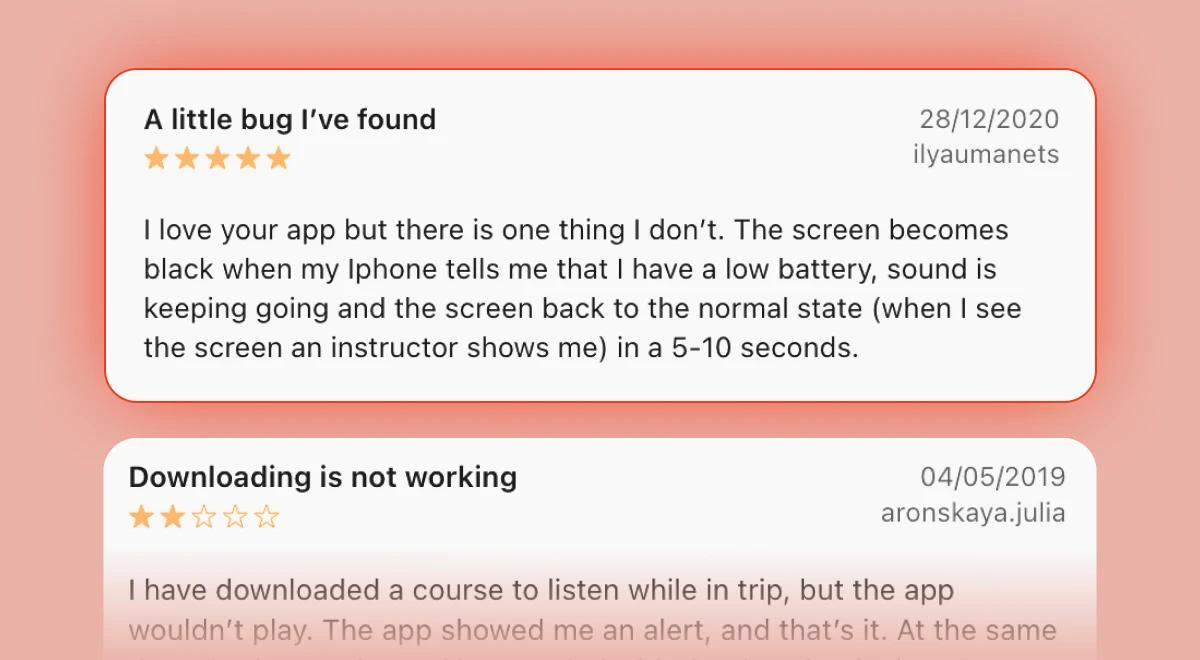
"I love your app, but there is one thing I don't. The screen becomes black when my iPhone tells me that I have a low battery, sound is keep going, and the screen back to the normal state in 5-10 seconds." - 5/5 stars
"White controls in the video player make it impossible to use on iPad and iPhone. Most of courses have white background videos." - 1/5 stars.
"I have downloaded a course to listen while in trip, but the app wouldn't play. The app showed me an alert and that's it." - 2/5 stars.
*These are selected reviews, not the full rating. Current scores are available on Trustpilot/Google Play/App Store.
Build a reading habit with Headway!
LinkedIn Learning is an excellent tool when you need to master a specific software application or follow a structured video course. However, learning does not always require sitting through hours of video lectures. Sometimes, the best way to challenge your thinking and discover new strategies is through reading.
This is where Headway offers a completely different approach to personal development. Headway provides 15-minute text and audio summaries of the world's best nonfiction books.
If you are exhausted from staring at video tutorials but still want to explore new ideas in leadership, business, and psychology, Headway breaks down massive concepts into digestible insights you can consume on a short walk.
If you are weighing different microlearning platforms, checking out a Headway vs Blinkist comparison shows how easily short-form reading fits into a crowded schedule. You do not have to choose between formal training and casual reading; they complement each other perfectly.
📘 Try the Headway app today to turn your downtime into a powerful habit of continuous growth.
*This review was prepared by the Headway editorial team and is current as of October, 2026. App prices, ratings, and features can change — check the App Store, Google Play, Trustpilot, and the app's official site for the latest updates.
FAQs about LinkedIn Learning
Is LinkedIn Learning worth it?
It is highly valuable if you need quick, practical workplace skills or if your company covers the subscription bill. However, if you are paying out of pocket for highly technical subjects or advanced engineering concepts, you might find the library a bit too shallow to justify the monthly expense.
How much does LinkedIn Learning cost?
The individual subscription costs $39.99 per month when billed monthly, or $239.88 annually, which reduces the monthly breakdown to roughly $19.99. Teams and enterprise licenses carry different pricing structures depending on the size of the organization, and a one-month free trial is available for new users.
How can I access LinkedIn Learning for free?
Many organizations offer free access to LinkedIn Learning for employees as part of their corporate training programs. Additionally, many public libraries and universities provide unlimited access to the platform for their patrons and alums, allowing you to bypass the subscription cost entirely.
Are LinkedIn Learning certificates worth anything?
Certificates indicate completion of professionally designed courses and show great initiative when displayed on your LinkedIn profile. However, they are not endorsed by universities or colleges, meaning they will not replace a formal degree, but they are excellent for showcasing your commitment to continuing education.
Does LinkedIn Learning offer continuing education units?
Yes, some LinkedIn Learning courses offer Continuing Education Units (CEUs) upon completion. The platform has partnered with dozens of organizations, such as the Project Management Institute, allowing professionals to earn the necessary credits to maintain their specific industry certifications and licenses.
How long are LinkedIn Learning courses?
Courses typically run for 2 to 4 hours, though some are much shorter. The platform organizes the content into bite-sized video lessons that usually last between three and five minutes each, making it exceptionally easy to learn incrementally during short breaks throughout your workday.
Can I watch LinkedIn Learning offline?
Yes, the LinkedIn Learning app allows offline video viewing. Videos can be downloaded directly to your smartphone or tablet, which is perfect for commuting, traveling, or learning in areas with unstable internet connections. The mobile app provides a highly optimized experience for offline learners.
Is LinkedIn Learning good for technical skills?
The platform is great for foundational tech skills and introducing new software, often utilizing virtual coding environments and exercise files. However, for highly advanced, complex technical training or deep software engineering, it may not offer the in-depth rigor required by senior IT professionals.