Self-growth
 Apps & Digital Tools
 Business & Career
 Success
 Growth Tools
 Psychology
 Communication
 Relationships

Most students reread and highlight, yet a major review of ten study techniques found that quizzing yourself and spacing out sessions beat both, the same idea the Gizmo app is built on.
It's an AI study tool that turns notes, PDFs, and YouTube videos into interactive flashcards and quizzes, so you skip the step where most study habits die: making cards by hand.
Want a daily reading habit that has nothing to do with exams?
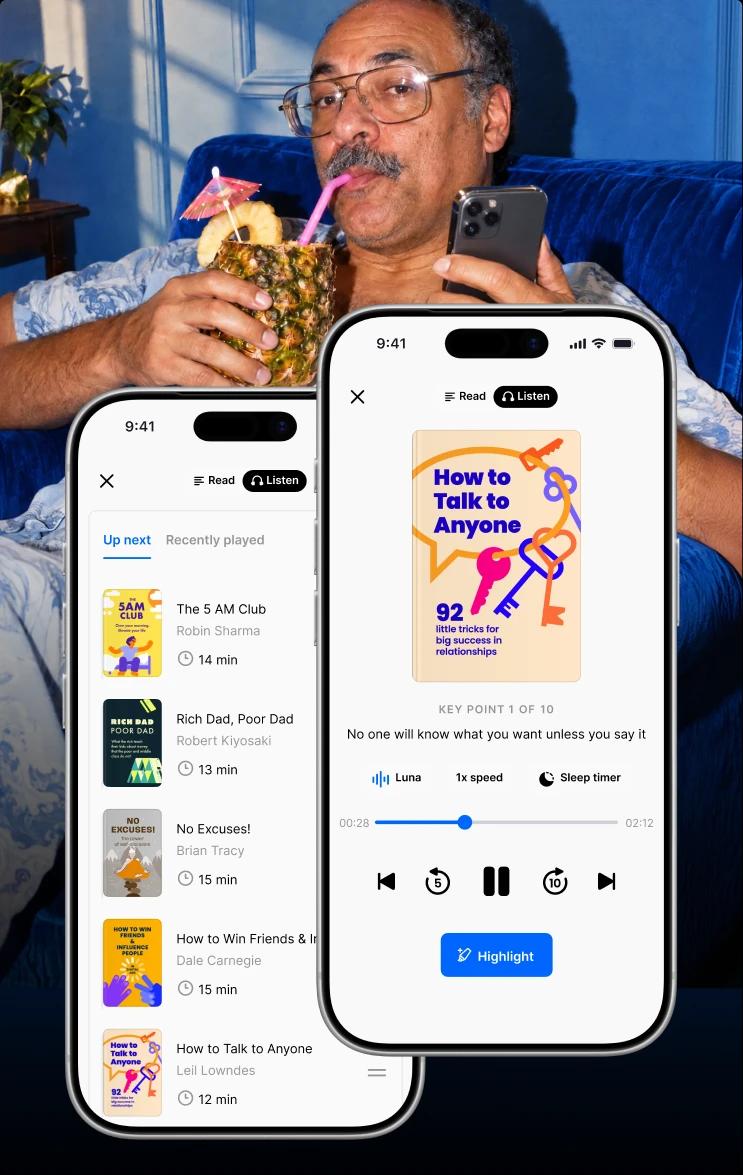
Download the Headway app and get 15-minute nonfiction summaries in text or audio on your phone.
It sits next to Gizmo rather than replacing it, and we'll show you exactly how near the end of this review.

Quick summary: The Gizmo app in five points before you download it
Here's the verdict before the detail:
The Gizmo app turns notes, PDFs, and YouTube videos into flashcards and quizzes.
The free plan caps hearts and imports, and Unlimited removes those limits.
Unlimited runs about $13.99 per week or $155 per year.
Reviews split: strong app store ratings, mixed Trustpilot billing complaints.
Best for exam cramming, weaker for offline study and highly technical subjects.
Keep reading for the full breakdown of features, safety, and what real users say.
What is the Gizmo app and who is behind it?
What is the Gizmo app, in one line? It's an AI flashcard and quiz platform built around spaced repetition and active recall, two methods backed by learning science. Spaced repetition shows each card again right before you'd forget it. Active recall means you answer from memory instead of rereading.
The developer on both stores is Save All, which says it was founded in London in 2021 by University of Cambridge graduates. TechCrunch reported its $3.5M seed round in September 2023, and a 2026 TechCrunch follow-up covers a $22M Series A. You can see the product on the official Gizmo site.
Not the Gizmo you're looking for?
Gizmo: Make Gizmos by Atma Sciences is a free iPhone app for building and sharing mini-apps from text prompts.
GizmoHub is Verizon's companion app for parents who set up a Gizmo kids' watch.
📘 Get bite-sized nonfiction reading on Headway!
How the Gizmo app works: Your first quiz from uploaded notes
Here's the flow, based on Gizmo's help center:
Sign up and pick a subject. Download the app or visit gizmo.ai, create an account, and tell Gizmo what you're studying.
Import your study materials with Magic Import. Choose a PDF, pasted notes, a YouTube link, a PowerPoint, a lecture recording, a photo of handwritten notes, or a Quizlet or Anki deck.
Review the generated cards. Gizmo highlights key words in green, and those are the words you'll be quizzed on.
Quiz yourself in Memorize mode. Each wrong answer costs a heart, and the free plan gives you up to 15.
Let spaced repetition schedule the next review. Cards come back at intervals instead of all at once.
One tip from the help center: import big documents in smaller sections so Gizmo doesn't skip anything. If a card doesn't click, the AI Tutor can walk you through the topic step by step, write notes, or quiz you with questions based on your own content.
Gizmo's review schedule uses spaced repetition. For other apps built on the same method, see our guide to spaced repetition apps.
Gizmo app features: Interactive flashcards, quizzes, and an AI tutor
Here are the features students use most, based on the store listings and Gizmo's help center.
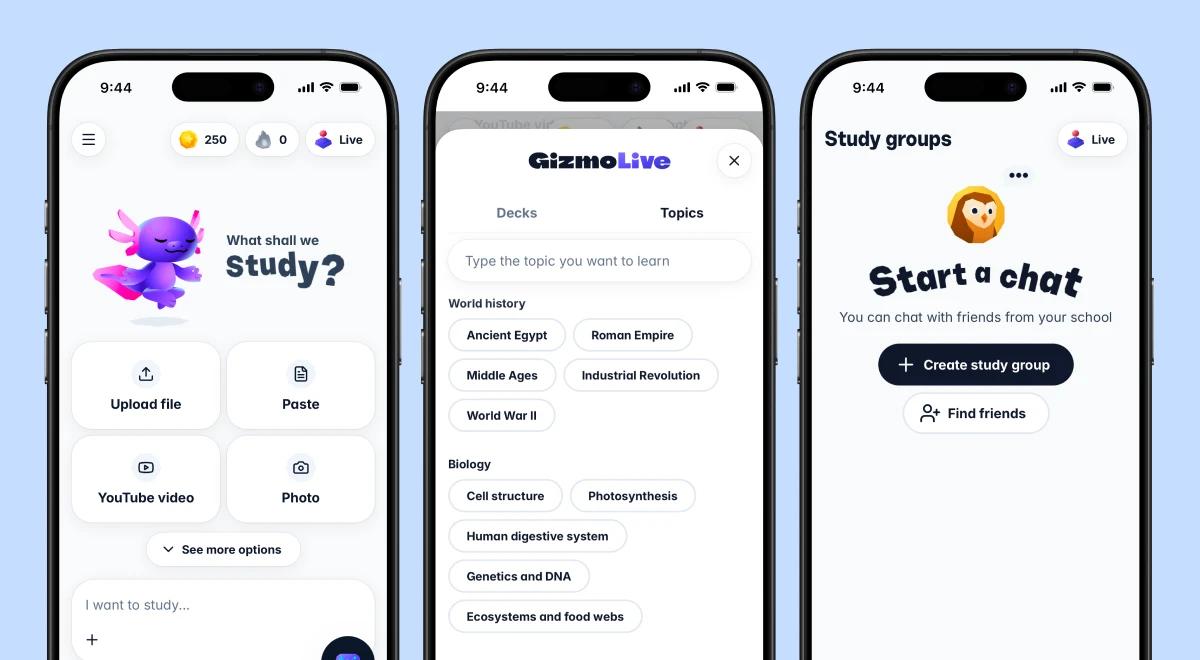
Interactive flashcards and quizzes that feel like a game
Gizmo is built to feel more like a game than a stack of index cards. XP, levels, leagues, and streaks track your progress, and streaks reward daily use, so you'll want to keep yours going.
The App Store listing describes a simple, minimalist design that keeps the screens clean even with the game layer on top. Questions come as multiple-choice or written answers, and wrong answers cost hearts, which creates the free plan's biggest limit.
Import YouTube videos, PDFs, and notes.
The Gizmo app lets you paste a YouTube link, upload PDFs, or drop in typed notes, and cards appear within seconds. It also takes PowerPoint files and Quizlet or Anki decks. Quality varies, though. One App Store reviewer studying cranial bones said the quizzes asked about nerves they hadn't covered yet, so give every imported deck a quick edit.
Save files, decks, and shared study sets
Gizmo is organized around files and decks so that you can keep one folder per class. You can save files you've imported, share decks with friends, or borrow public sets from other students. The App Store listing claims more than 1,000,000 free public flashcards. If you also study from course documents, our Course Hero review covers another way to find them.
AI Tutor, Gizmo Live, and studying with friends
Free accounts get five AI Tutor sessions per day, according to the help center. Gizmo Live turns any deck into a real-time multiplayer quiz. You share a game code with friends or classmates, race to answer, and earn XP for speed and accuracy. If homework help is your main need, our Brainly review is worth a look.
iOS, Android, and web
You can download Gizmo from the App Store or Google Play, or visit gizmo.ai and sign in on the web. The iOS app needs iOS 16.4 or later. On Android, Google Play shows more than 5 million downloads.
📘 Test a daily reading break on Headway!
Gizmo app pricing plans: What the free plan covers and what Unlimited costs
How much does the Gizmo app cost? Creating cards and decks is free. Paid access comes through an Unlimited plan, billed weekly or yearly, and here's how the plans stack up.
| Plan | Price | What you get | Watch out for |
|---|---|---|---|
Free | $0 | Unlimited cards and decks, up to 15 hearts, Magic Import with a 20-minute wait, five AI Tutor sessions per day | Hearts run out on wrong answers; imports are throttled |
Unlimited (weekly) | About $13.99 per week (about $6.99 with student discount) | Unlimited hearts, imports, AI Tutor, and hints | Auto-renews weekly; cost adds up fast outside exam season |
Unlimited (yearly) | About $155 per year (about $2.99 per week) | Same as weekly | Large upfront payment; App Store also lists regional tiers |
The App Store lists several Gizmo Unlimited price points, including $6.99, $77.99, and $154.99, so the amount you see can differ. Check the final price at checkout before you pay.
The weekly plan suits exam bursts. Gizmo calls it the Last-minute plan, and it renews every week until you cancel.
The yearly plan suits daily users. Gizmo calls it the Long-term plan, and it works out to about $2.99 per week.
Cancellation works through wherever you paid: Apple's Settings app, Google Play, or the Gizmo website.
Eligible students see a discount toggle during sign-up. Cancel the subscription itself before you delete your account, because the stores bill you separately from Gizmo.
Is the Gizmo app safe? Permissions, privacy, and data security
Gizmo is a mainstream study app from a London company, and it publishes a privacy notice that was last updated on September 11, 2026. The catch is that your uploads leave your device.
Gizmo says it shares study materials, photos, and notes with an AI supplier to produce answers and improve its AI, and that it may use personal information to train AI models in some cases. Upload selectively.
The App Store label lists purchases, contact info such as name, email, and phone number, contacts, identifiers, and usage data as data linked to you. It also says some identifiers and usage data may be used to track you across other companies' apps and websites.
The Google Play listing says no data is shared with third parties, data is encrypted in transit, and you can request deletion. It also says the app may collect location and personal info, plus seven other data types.
Gizmo's notice adds that location comes from your Wi-Fi connection, and that it doesn't sell personal information. Account information includes your first name, email or phone number, and age.
On your device, photo import and lecture recording will ask for camera, photos, or microphone access, and file uploads use your device storage. You can switch each permission off in your settings.
For security, Gizmo says it uses physical, technical, and organizational measures, and admits no system is completely secure. Parents or guardians of younger students should review the settings themselves.
Before you upload anything, run through this short checklist:
Read the privacy notice.
Leave out documents with private details, such as ID scans or medical records.
Check your permissions in device settings and switch off what you don't need.
Cancel through the store or site where you paid.
Gizmo app pros: What students rate highest
Here's what reviewers praise most, with the proof behind each point:
Skips manual card-making, the step where most flashcard habits quietly stop. A doctoral student on the App Store said the AI cards saved a lot of study time.
Built-in spaced repetition and active recall, the two methods rated high utility in the Dunlosky review.
Card and deck creation is free and unlimited, even on the free plan.
Imports from YouTube videos, PDFs, Quizlet, and Anki, so your old decks keep working.
Game mechanics like streaks, leaderboards, and Gizmo Live help students who struggle to keep a study habit.
Strong store ratings: 4.8 on the App Store from 14K ratings, and 4.6 on Google Play from more than 110K reviews.
📘 Start a reading streak that outlasts exam week on Headway!

Gizmo app cons: Where the app frustrates users
These complaints show up most in reviews and in Gizmo's own help pages:
Hearts lock free users out after wrong answers, and imports carry a 20-minute wait.
Weekly pricing is steep for casual use. Four weeks of the weekly plan costs about $56, more than a third of the yearly price.
Two of the six Trustpilot reviewers report trouble canceling.
AI cards can miss nuance on technical or medical subjects and need editing.
Most features need an internet connection. Neither store listing mentions offline study, and independent reviews report no offline mode.
Reviews contradict each other on deck export, so test it with a small deck before you build a big library.
Gizmo app reviews: What real users say on Trustpilot, Google Play, and the App Store
Gizmo app reviews split into two camps. The app stores are strongly positive, while Trustpilot is small and mixed. Its Trustpilot profile shows 3.1 out of 5 from six reviews, half five-star and half one-star.
Here's what the Trustpilot reviewers said:
Amy Rodgers (1 star, May 12, 2026), "Impossible to cancel." She asked if anyone had canceled a subscription successfully.
TheChillyPig (5 stars, May 7, 2026), "Best revision app." A short note of praise for revision use.
David Gumbrell (1 star, March 8, 2026), "Eternal Subscriptions can't be canceled." He says there's no unsubscribe option in the web app or mobile app, and that support didn't respond.
Ann (5 stars, 2025), "I enjoy the app." She says it's easy to tweak to fit a subject.
Maria (5 stars, May 21, 2025), "Please stop breaking." She reports crashes twice in one week during exam season.
On the US App Store listing, Highrow254 (December 31, 2024) credits the AI cards with big time savings but says older cards come back more slowly than in Anki. exccigames (September 28, 2025) calls it a favorite study app, then lists bugs, including a deck list that jumps back to the top.
The Google Play page tells a similar story. yunyunyuna nana (December 1, 2024) likes importing pictures and files but dislikes slow imports and daily limits. Nezuko (September 18, 2025) reports lag and endless loading. Maria Dulalia (August 19, 2025) says questions drifted away from her uploaded lessons.
| Platform | Score | Sample size |
|---|---|---|
Trustpilot | 3.1 out of 5 | 6 reviews |
App Store (US) | 4.8 out of 5 | 14K ratings |
Google Play | 4.6 out of 5 | 110K+ reviews |
These are selected reviews, not the full rating. Current scores are available on Trustpilot/Google Play/App Store.
📘 Get 15-minute summaries on your commute with Headway!
Gizmo app vs Quizlet vs Anki: Which study tool fits you?
In a Gizmo app vs Quizlet matchup, the biggest difference is who builds the cards. Gizmo does it for you, Quizlet puts most of its AI features behind a paid plan, and Anki leaves it mostly up to you.
| Tool | Card creation | Setup speed | Free tier |
|---|---|---|---|
Gizmo app | AI generation built in | Fast | Capped by hearts and import waits |
Quizlet | AI features mostly paid | Medium | Limited |
Anki | Mostly manual or add-ons | Slow | Free on desktop, web, and Android; paid on iOS |
Gizmo wins on speed and motivation. In the Gizmo app vs Anki debate, Anki wins on control and offline use. Quizlet wins on its long-running library of shared sets. We haven't run all three head-to-head, so that we won't crown a winner.
Who should use the Gizmo app (and who should skip it)
Here's a quick filter based on how you study. Pick the group that sounds most like your semester.
Use it if:
You cram for exams, like an AP Biology review the week before the test.
You hate writing cards and would rather study from lecture PDFs or YouTube videos.
You study a language and want a vocabulary set built from your textbook.
You need a streak to stay consistent.
You want to quiz with friends in Gizmo Live the night before a test.
Skip it if:
You study offline on flights or in low-signal places.
You need precise technical cards, such as organic chemistry mechanisms, without editing.
You want a fixed low price.
You dislike streak pressure.
You think in diagrams and visuals, and our Imprint app review covers a visual option.


Where the Gizmo app stops, and Headway starts
Gizmo helps you hold on to the material a course hands you. Headway helps you choose and absorb nonfiction ideas on your own schedule. One covers next week's test, and the other covers the reading you do for yourself.
Side by side, that looks like flashcards for Friday's exam and bite-sized text and audio summaries for the commute, the walk to class, or ten spare minutes. Personalized daily recommendations and progress tracking keep the second habit going without a syllabus.
It's microlearning built around a daily habit. Sessions can run as short as three minutes, and the free plan includes one full summary per day. If you're comparing summary apps, see Is Blinkist worth it? and Headway vs Blinkist.
Why Headway works
Audio and text summaries of nonfiction bestsellers, written by editors and voiced by actors.
Personalized growth plans from a short onboarding quiz, updated as you use the app.
Spaced repetition cards and highlights that bring saved ideas back later.
Offline mode, so downloaded summaries play on flights and commutes.
Apple CarPlay and Android Auto support for hands-free listening.
Daily streaks that count even a three-minute session.
📘 Try audio and text summaries side by side on Headway!
Turn spare minutes into growth with Headway
Here's the decision framework in short. Use the Gizmo app's free plan to see if it fits how you study, buy the weekly plan for an exam burst, and choose yearly only if you'll open it daily. That covers the cards you have to learn. For the reading you choose yourself, Headway is the easier companion.
Headway turns nonfiction bestsellers into 15-minute summaries you can read or listen to. Personalized recommendations point you to the next one, spaced repetition cards and highlights keep saved ideas close, and daily streaks make showing up a little more fun.
Download the Headway app and start with one free summary today, right alongside your Gizmo routine.
This review was prepared by the Headway editorial team and is current as of October, 2026. App prices, ratings, and features can change. Check the App Store, Google Play, Trustpilot, and the app's official site for the latest updates.
FAQs about the Gizmo app
Is the Gizmo app free?
Yes, with limits. Creating cards and decks is free and unlimited, and the free plan includes up to 15 hearts in Memorize mode, Magic Import with a 20-minute wait between imports, and five AI Tutor sessions per day. Unlimited removes those caps. It costs about $13.99 per week or $155 per year, and eligible students may see a discount at sign-up.
How do you cancel the Gizmo app subscription?
Cancel where you paid. On iPhone, open the Settings app, tap your name, then Subscriptions, and choose Gizmo. On Android, open Google Play, go to Payments and subscriptions, and select Gizmo. If you subscribed on the website, use Manage subscription in Settings. Subscriptions auto-renew weekly or yearly until you cancel, so do it before the next billing date.
Can the Gizmo app turn YouTube videos and PDFs into flashcards?
Yes. Magic Import accepts PDFs, pasted notes, photos of handwritten notes, PowerPoint files, lecture recordings, and Quizlet or Anki decks, and Gizmo's help center also lists adding a YouTube link. After the import, the app highlights keywords in green and builds cards around them. Check the deck before you study, and import big documents in smaller sections.
Is the Gizmo app better than Quizlet?
Gizmo is faster if you want cards built from your own notes, and its streaks and hearts push you to keep studying. Quizlet is better known and offers a long-running library of shared sets. Both limit free use, so we recommend trying each with one real deck before you pay. We haven't tested them head-to-head, so treat this as a question of fit.
What age do you need to be to use the Gizmo app?
Gizmo's privacy notice says users must be 13 or older, and children under 13 aren't allowed to use the service. The App Store lists a 13+ rating, while Google Play shows a 3+ content rating, so the stores don't agree. Gizmo's chat feature adds age checks, and it deletes photos used for those checks 24 hours later. Parents should review the settings for younger teens.
How long does the Gizmo app keep your study materials?
According to Gizmo's privacy notice, your decks, study materials, and progress stay for as long as you have an account. If you stop logging in, Gizmo deletes or anonymizes the account after three years if you were under 18, and after ten years if you were 18 or older. You can ask to see or delete your data by emailing support@gizmo.ai.
How many people use the Gizmo app?
TechCrunch reported in April 2026 that Gizmo had passed 13 million users across more than 120 countries, up from about 300,000 at the time of its 2023 seed round. Google Play shows more than 5 million downloads on Android alone. Funding coverage says most of that growth came through word of mouth.
What happens to your hearts during an AI Tutor session?
Quizzes inside an AI Tutor session run on the same system as Memorize mode, so they use hearts, hints, and Super Hearts. That's separate from the daily session limit, so running low on hearts doesn't use up a session, and starting a new session doesn't refill your hearts. Unlimited removes both the session cap and the heart limit.