Self-growth
 Apps & Digital Tools
 Business & Career
 Success
 Growth Tools
 Psychology
 Communication
 Relationships

In a 2025 randomized trial published in PNAS Nexus, 467 people used Freedom to block mobile internet on their phones for two weeks. Their sustained attention improved by roughly what ten years of age-related decline would cost.
But there is a massive catch. Only about a quarter of the participants stayed blocked for the full two weeks. That specific drop-off rate is the exact tension behind any honest Freedom app review.
Freedom is a cross-platform distraction blocker designed to prevent access to distracting websites and apps across your devices. You know the drill: you sit down at your computer to finish a project, and thirty minutes later, you are mindlessly scrolling on your phone.
This app review covers how well the software breaks that habit, what the Freedom app pricing actually looks like today, and whether it beats the default screen time settings on your phone.
📘 Looking to do something instead of scrolling? Get Headway and access the library of 2,500+ summaries of nonfiction titles in text and audio formats.

Quick summary: The Freedom app at a glance
Freedom blocks distractions across Mac, Windows, iOS, and Android. It offers:
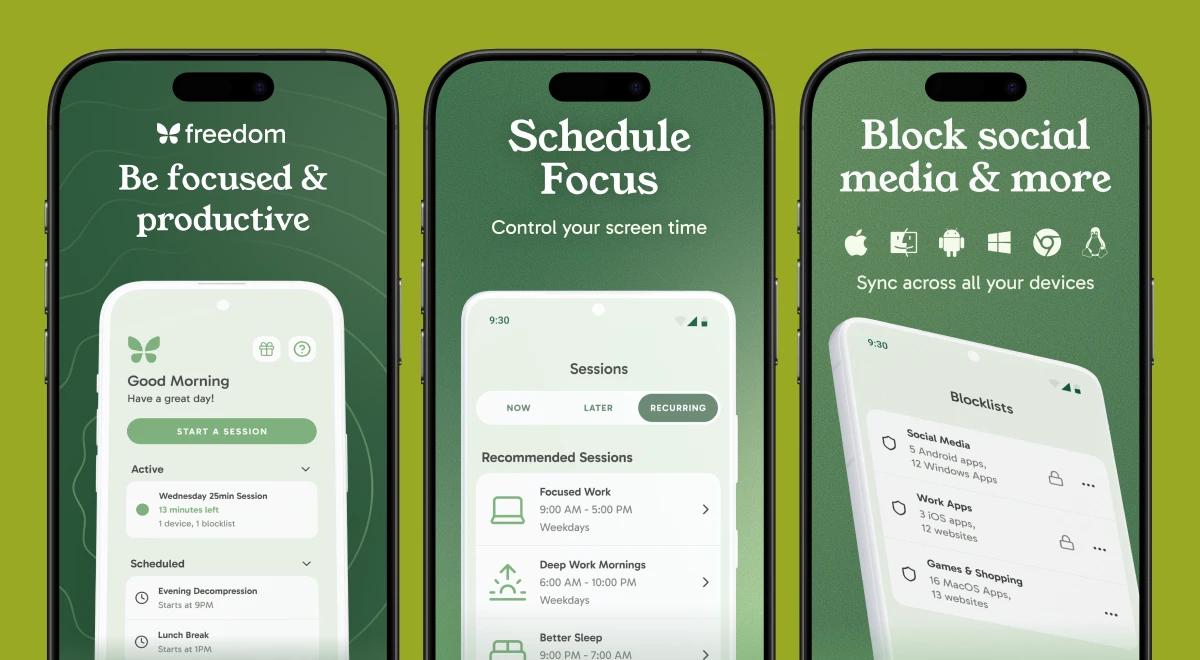
Locked mode that prevents users from ending sessions early.
Sessions sync across devices and can recur on a schedule.
The yearly plan costs $39.99; a lifetime license is $99.50 on sale.
Results that depend completely on your blocklist and your commitment to it.
How the Freedom app works across Mac, Windows, and mobile platforms
Freedom launched in 2009 and covers desktop apps and mobile operating systems under one umbrella. As an app blocker, it provides complete cross-platform coverage, so you don't just close your laptop and immediately pick up your phone.
You can sync blocks across multiple devices simultaneously. This cross-device syncing is the main reason people pay for it.
If you want to block websites, you have several choices. Freedom includes preset blocklists for common distractions, or you can manually block specific sites, specific websites, or the entire internet.
If you need to access your email but nothing else, you create a website exceptions list (also just called an exceptions list) to keep only what you absolutely need online.
It works across Mac, Windows, iOS, and Android natively. Blocking apps on one platform pushes the restriction to the other devices automatically. Setup might require adjustment as it differs across operating systems, especially between desktop and mobile apps.
The dashboard is clean, focusing strictly on functionality. If you normally use gamified Habitica alternatives, you won't find leveling up, points, or avatars here. Freedom is purely about gaining focused time for writing or coding.
Locked mode and advanced scheduling
The best feature for many people is the locked mode. When enabled, locked mode prevents users from ending sessions early. If you try to disable the block session before the session ends, the app stops you. This creates intense friction right when your self-control runs low.
You can also use advanced scheduling to schedule recurring events. This lets you set up recurring sessions that start automatically every morning. It turns focus sessions into an involuntary routine.
Pairing this automated approach with the daily habit-building discussed in the Fabulous app review makes the app highly effective. You can align these blocks perfectly with Pomodoro sessions to take breaks without falling down an internet rabbit hole.
All the features require a premium subscription, but advanced features like scheduling are what make the software actually work.
There is one notable user complaint to flag: some people prefer to start and stop blocks strictly by the time of day rather than relying on a countdown timer, which the current interface leans heavily toward.
📘 Stop losing your afternoon to mindless scrolling. Try the Headway app to read actionable 15-minute book summaries during your breaks instead.
Freedom app pricing and the Freedom plan
Understanding the freedom plan requires looking at the billing cycles.
| Plan | What it includes | Price |
|---|---|---|
Free | Basic blocking, limited trial of 7 total sessions | $0 |
Premium Monthly | Unlimited sessions, scheduling, recurring sessions, locked mode | $8.99/month |
Premium Yearly | All premium features, 7-day free trial | $39.99/year |
Forever | Lifetime license, permanent access to all features | $99.50 (regularly $199) |
*Prices are verified against the official pricing page and are relevant as of October 2026, but always check the official website for current sales before buying.
The free tier is highly restricted, offering just a free trial of 7 sessions. To get full features, unlimited sessions, and cross-device blocking, you need a paid subscription to Freedom.
The yearly plan costs $39.99 per year, which breaks down to around $3.33 a month. A lifetime license for Freedom costs $99.50 during frequent sales, offering a one-time payment for permanent access.
Does the Freedom app work for deep work?
When evaluating if the Freedom app works as it claims, the numbers are strong. Over 2.5 million people use Freedom to regain focus. The company states that Freedom users report gaining an average of 2.5 productive hours daily.
Users find that Freedom reduces mindless opening of apps and websites during work sessions. When you block distractions, you stop the automatic reflex to check other websites.
Interestingly, some users report better sleep and reduced anxiety simply by blocking social media in the evening. User consensus indicates that Freedom is most effective when users know their distractions.
The effectiveness of the app relies entirely on user configuration and commitment to the blocking rules. If you are reading a Stoic app review to manage anxiety, blocking late-night doomscrolling with Freedom is a practical companion step. You can also view your session history to see exactly how much time you spent offline.
Is the Freedom app safe?
Privacy is a massive concern when you give a program access to monitor your web traffic. So, is the Freedom app safe? It relies on local vpn technology, particularly on iOS and mobile devices.
This vpn based blocking means your web traffic does not actually route through external servers. The local VPN simply drops connections to distracting sites on the device itself.
According to their privacy policy, they do not track your browsing history or sell your data. However, Freedom's blocking can fail if users actively disable the app or the VPN from the system settings. It is safer for privacy than many other screen time apps, but you have to trust the tool and not actively try to break it.
📘 Reclaim your attention span. Download Headway for bite-sized insights from the world's best productivity and psychology books.
Blocking apps effectively: The pros
Setting a block on one platform pushes the restriction to all other devices seamlessly.
Locked mode prevents early session termination, enforcing real discipline.
Advanced scheduling and recurring events completely automate your daily focus.
It works far better than native iPhone screen time because it covers Mac and Android simultaneously.
The interface is clean, professional, and entirely free of distracting features.
It is backed by a published trial using the actual app in a real-world setting.
Where the app blocker falls short: The cons
Premium is absolutely required for advanced features; the free version is basically just a trial.
Setup varies wildly by operating system and can feel frustrating on mobile.
You can easily bypass the block if you just delete the app or manually turn off the VPN.
Results depend heavily on your own configuration and self-awareness.
Monthly billing is relatively high, pushing users toward the yearly plan (a similar frustration mentioned in the is Blinkist worth it breakdown).
Some users find the interface unclear about what a session will actually do once started.


Freedom app review: What users say on App Store
Here is exactly what real users have experienced when using the app, pulled directly from the App Store.
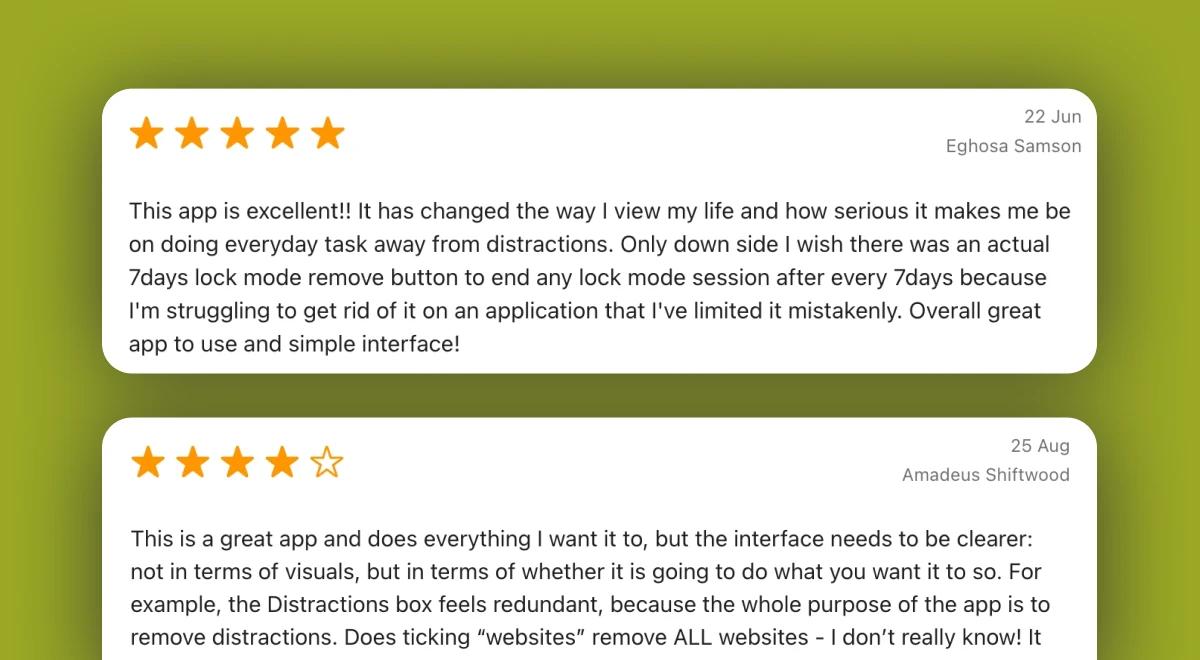
"The app is excellent. It has changed the way I view my life and how serious it makes me be on doing everyday tasks, away from distractions." — 5/5 stars
"This is a great app, and does everything I want it to. But the interface needs to be clearer, not in terms of visuals, but in terms of whether it is going to do what you want it to." — 4/5 stars
"I have come to rely on this app and it really helps me cut down on phone use in a practical way. It's expensive, but until recently I thought it was money well spent. However, I will not renew my subscription when it comes to round unless Freeform reinstall the option to start and stop your session by time of day rather than a countdown timer." — 4/5 stars
*These are selected reviews, not the full rating. Current scores are available on Trustpilot/Google Play/App Store.
Turn your focused time into personal growth with Headway!
Once you block websites and gain back those hours, you need something worthwhile to do with your time. Freedom removes the noise, but Headway provides the signal. Headway offers 15-minute text and audio summaries of the world's best nonfiction books.
If you are comparing learning tools in the Headway vs Blinkist guide, you know how powerful microlearning can be. Instead of staring at a blank screen when you hit a block page, you can read the core concepts from top psychology and business books.
📘 Headway ensures that when you finally put your phone down, you actually grow during your focused time — try the app today.
*This review was prepared by the Headway editorial team and is current as of October, 2026. App prices, ratings, and features can change — check the App Store, Google Play, Trustpilot, and the app's official site for the latest updates.
FAQs about the Freedom app
How does the Freedom app work?
Freedom acts as an app blocker that shuts off access to distracting websites and apps across your devices. You create a block session, pick the websites you want to avoid, and the software prevents you from opening them until the timer officially runs out.
Is the Freedom app safe to use?
Yes, the application is entirely safe. It utilizes a local VPN on mobile devices, meaning it blocks connections directly on your phone without routing your browsing traffic through external servers. Freedom explicitly does not track or sell your search history.
How much does the Freedom app cost?
The yearly plan costs $39.99 per year, which breaks down to around $3.33 a month. A monthly subscription runs $8.99. You can also buy a lifetime license, which often goes on sale for $99.50 instead of the standard $199 price.
What is Locked Mode in Freedom?
Locked mode is a rigid setting that prevents users from ending sessions early. Once you turn it on, you cannot quit the block session or bypass the restriction until the timer naturally hits zero. It forces self-control when your willpower inevitably runs out.
Does Freedom work on iPhone alongside Apple Screen Time?
Yes, it operates completely independently of native iPhone screen time limits. While Apple allows you to ignore daily limits with a simple tap, Freedom's local VPN-based blocking physically prevents the page from loading, providing a much stricter barrier.
Can you schedule recurring blocking sessions in Freedom?
Absolutely. Advanced scheduling is a premium feature that lets you set up recurring events. You can configure a focus session to automatically start every morning at 9 am, turning distraction-free focused time into a daily routine you don't even have to think about.
Does Freedom block apps on Mac and Windows as well as phones?
Yes, it provides total cross-platform coverage. The software natively blocks desktop applications and distracting sites on Mac and Windows computers, and it syncs those restrictions directly to your mobile apps on iOS and Android devices simultaneously.
Is the Freedom app worth paying for?
If you lose hours every week to social media, the yearly plan pays for itself quickly. Users consistently report gaining an average of 2.5 productive hours daily. However, it only works if you actually commit to setting up the blocklists and using locked mode.