Self-growth
 Apps & Digital Tools
 Business & Career
 Success
 Growth Tools
 Psychology
 Communication
 Relationships

In a Pew Research Center survey from May and June 2026, 53% of US adults said they spend too much time on their smartphones, including 70% of adults under 30, and 45% said they had tried to cut back in the past year.
Forest is built for exactly that attempt. If you find yourself mindlessly opening social media when you should be working, the central question for any Forest app review is whether a growing virtual tree can hold up where your own willpower did not.
Forest is a focus timer from Seekrtech where you grow a virtual tree for the length of a session, and leaving the app kills the tree. It blends behavioral psychology with cute graphics to keep you engaged in the real world rather than lost in an endless feed.
This app review covers exactly how that system functions, what the recent shift in Forest app pricing actually means for your wallet, and whether the company really does plant trees across the globe.
📘 You saved time on social media, and not sure where to use it now? Try the Headway app and learn something new from quick, 15-minute audio and text summaries.

Quick summary: The Forest app at a glance
Forest grows a virtual tree during focus sessions and kills it if you leave.
Deep Focus blocks distracting apps; Time Guard schedules blocks across the day.
Coins from sessions can fund real trees through Trees for the Future.
Forest is free to download, with a Forest Plus subscription since December 2025.
It works as a soft nudge, not a hard blocker.
How the Forest app works: Loss aversion and a virtual forest
The premise of the Forest app is brilliantly simple. When you need focused time to study, write, or work, you open the app and set a pomodoro timer. You plant a seed, and as you stay productive, the seed gradually grows into a virtual tree.
However, if you leave the app to check your messages or open a distracting game, your tree dies, leaving a withered, dead tree stuck permanently in your virtual forest.
This entire system operates on loss aversion principles to deter phone checking. Human psychology dictates that the pain of losing something (even a digital tree) often outweighs the fleeting pleasure of gaining something (like seeing a new social media notification).
The app has a minimalist design that minimizes distractions while still providing a highly visual, emotionally engaging reason to put your phone down. Because the core focus works offline, you can even switch your phone to airplane mode without interrupting the timer.
Each time the tree grows to completion, it gets added to your virtual garden. Over time, this tracks your focus history and total focused hours, turning your daily efforts into a visual landscape.
If you are comparing gamified productivity tools like Habitica alternatives, you will notice that Forest emphasizes gamified productivity to engage users without requiring them to build complex RPG-style avatars.
Users report a sense of accomplishment from building a forest over time, and the app provides detailed statistics and reports on user productivity patterns.
Forest app features: Deep Focus, Time Guard, and Plant Together
While the basic timer works well, Forest helps individuals trying to reduce phone distractions during focus tasks by offering several advanced features.
1) Deep focus and app blocking
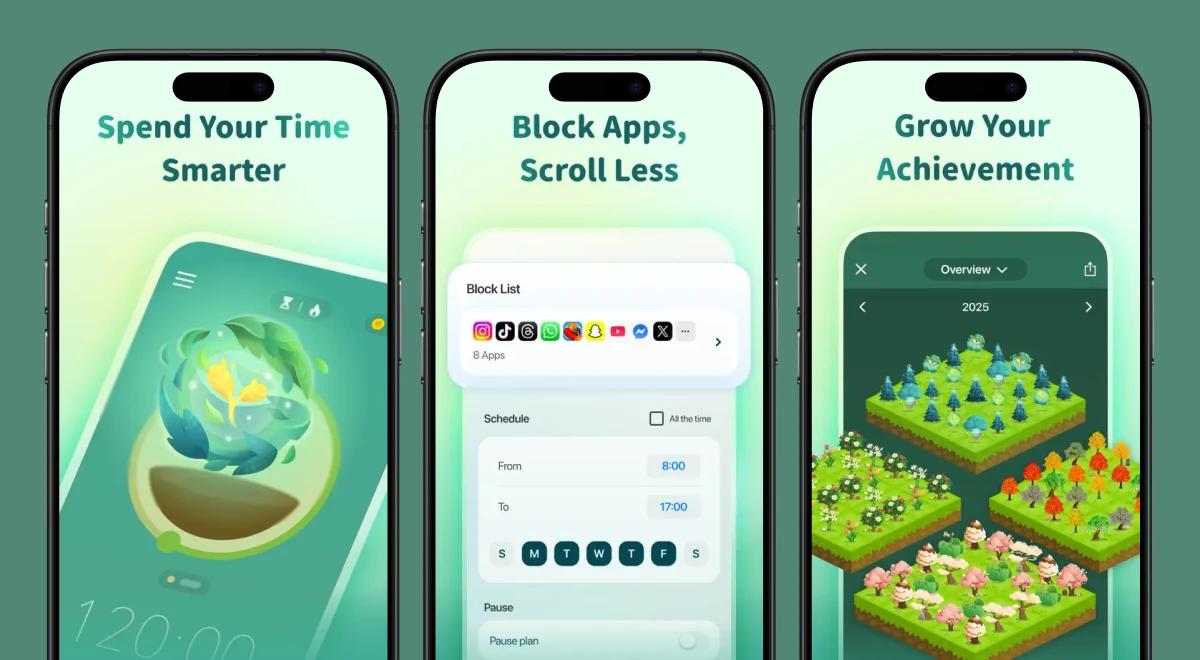
Forest includes app-blocking features to help maintain focus during sessions. Turning on Deep Focus mode blocks distracting apps completely while the timer runs. Using other apps during focus kills the virtual tree.
However, the software allows for custom app allowlists, meaning you can still access critical tools for work without triggering a penalty. You can also utilize the multi-app time guard scheduling tool to enforce strict app blocks at specific points throughout the workday.
2) Group focus and community
If you struggle to stay focused alone, Plant Together allows for group focus sessions. You can invite friends to join a room; if anyone in the group leaves the app, everybody's tree dies. The app regularly hosts a Focus Challenge, alongside various seasonal events to keep the community motivated.
3) Custom tags and ambient sounds
To build a better environment, Forest encourages users to track focused time with visual statistics and custom tags, letting you see exactly how many hours you spent studying versus reading.
Listening to ambient sounds can also help. The Mindful Space feature offers audio backgrounds. Free users get one basic soundscape, while premium users unlock full soundscapes, letting you work to the hum of a Paris café or heavy rain. You can even spend your earned focus coins on new tree types, like a magical sunshine elixir plant.
You can run the service across multiple devices. The app is available on iOS and Android platforms, including an Apple Watch integration and a Chrome extension.
Because Forest supports cross-device syncing across multiple platforms, locking your phone also locks your desktop browser. If you want to build strong daily routines, tying this timer to the morning habits explored in a Fabulous app review makes a big difference.
📘 Want to make the most of your newly reclaimed time? Try the Headway app to read or listen to 15-minute book summaries during your mindful breaks.
Does Forest really plant real trees?
Forest has helped plant over 2 million real trees since 2014. The mechanism is straightforward: successful focus sessions earn virtual coins that can be used to plant real trees.
Forest partners with environmental organizations to plant real trees using virtual coins. Specifically, Forest partners with Trees for the Future for tree planting. Trees for the Future trains local farmers in sustainable agroforestry, restoring degraded lands.
The actual tree planting happens across five African countries: Kenya, Senegal, Tanzania, Uganda, and Cameroon. When you spend earned coins to plant real trees in the app, Forest funds the planting using their own app revenue.
If ethical consumption matters to you — a theme often explored when reading a Stoic app review — this feature turns a digital detox into tangible environmental action.
However, there is a strict limit. Free users cannot support real tree planting. You must have a premium account to participate, and even then, real trees are capped at five per user account to keep the business model sustainable.
Forest app pricing and plans
The monetization model shifted recently, causing confusion for new users. Forest is a low-cost, typically one-time purchase historically, but that has changed.
Forest launched as a paid app in 2014 but transitioned to a free download with a Forest Plus subscription in December 2025. Older articles still incorrectly list a $3.99 one-time price tag.
| Plan | What it includes | Price |
|---|---|---|
Forest Free | Core focus timer, tree growth, Plant Together, Deep Focus mode, Mindful Space (one soundscape), basic stats. Displays occasional ads outside sessions. | $0 |
Forest Plus | Ad-free usage, 3x coin rewards, Plus-exclusive species, early access to seasonal plants, full soundscapes, and real tree planting access. | Retails around $59.99 annually (pricing varies by region and promotion). |
Legacy Forest Pro | Existing Pro users keep all their legacy Pro features permanently. | N/A (no longer available for new users). |
*Note: You must verify current pricing, as it may change and vary. Check the App Store or Google Play, as Forest frequently runs localized discounts and offers.
The free tier provides a highly functional focus app, but the occasional ads outside active sessions can be mildly annoying. Meanwhile, the Plus subscription unlocks everything else.
How well does the Forest app work as a Forest app blocker?
Forest operates strictly as a soft blocker. If you desperately want to check Instagram, you can simply tap "give up," kill your tree, and open the app.
The software relies heavily on your own internal commitment and the loss aversion of seeing a dead tree in your garden. It is not a hard blocker that physically locks you out of your device in a crisis.
If you are easily distracted and just need a gentle, visual nudge to stay productive, Forest helps immensely.
However, if you suffer from severe screen time addiction and need strict enforcement, you might need to pair it with OS-level restrictions. Currently, no published clinical trial evaluates Forest itself, so its efficacy relies on individual user commitment.
📘 Don't just sit there when your timer finishes. Use Headway to absorb core ideas from top-rated productivity books during your daily commute.
Pros of the Forest app
Playful, minimalist design that turns a simple timer into a meaningful game.
A genuinely useful free version that includes the core focus timer and Plant Together.
Translates digital focus into actual environmental impact through real tree planting.
Group sessions and Focus Challenge events offer strong social accountability.
Works seamlessly across iOS, Android, Apple Watch, and Chrome with cross-device syncing.
Cons of the Forest app
The free app displays ads outside of focus sessions, which interrupts the calming aesthetic.
It only provides soft app blocking; the tree dies, but you can still access certain apps if your willpower breaks.
The December 2025 pricing change moved the service from a cheap one-time purchase to an annual subscription. As noted in the is Blinkist worth it review, moving to a recurring subscription can frustrate casual users.
A recent update caused app crashes for some long-time Android users.
Real tree planting is entirely blocked for free users and strictly capped for paying users.


What users say about the Forest app: Google Play reviews
Forest has over 10 million downloads worldwide and holds a 4.6/5 rating from roughly 814,000 reviews on Google Play. Here is exactly what people are saying:
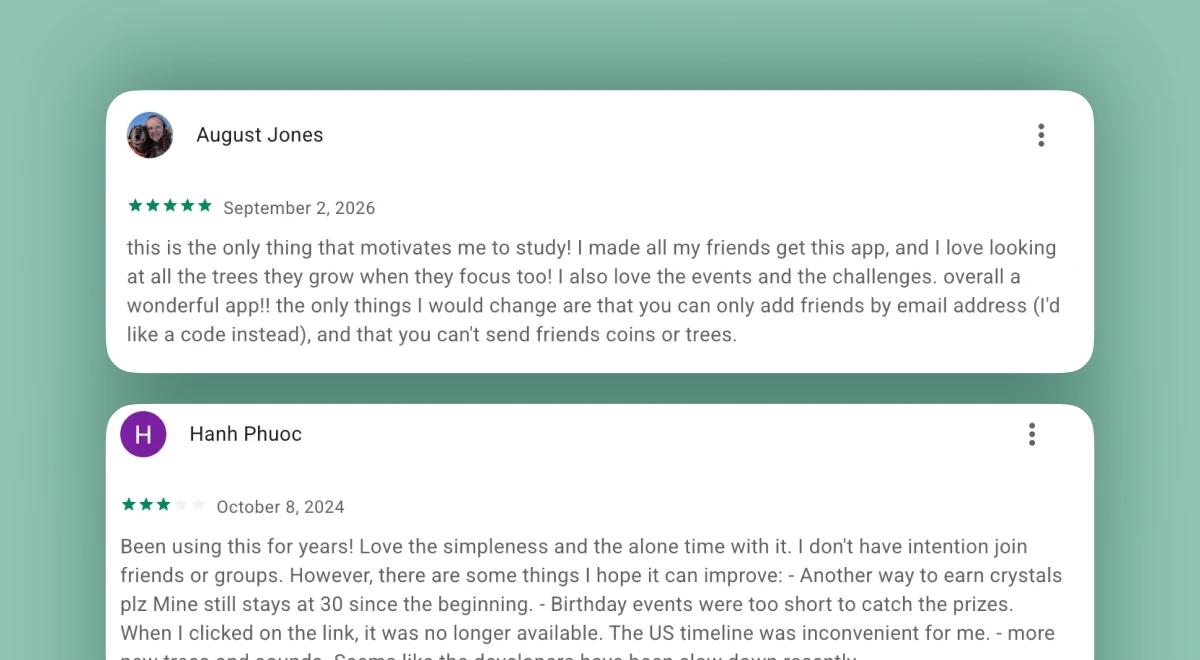
"This is the only thing that motivates me to study! I made all my friends get this app, and I love looking at all the trees they grow when they focus too! I also love the events and the challenges. overall a wonderful app!!" – 5/5 stars
"Ok, so I've been using Forest for at least a year, if not longer. Would've absolutely given 5 stars and a glowing review up until a week or so ago, when they released the newest update to the app. Now, the app keeps crashing over and over and barely working." — 3/5 stars
"Been using this for years! Love the simpleness and the alone time with it. I don't have intention join friends or groups. However, there are some things I hope it can improve: - Another way to earn crystals plz" — 3/5 stars
*These are selected reviews, not the full rating. Current scores are available on Trustpilot/Google Play/App Store.
What to do with the minutes Forest gives back? Use them with Headway summaries
When you finally put your phone down and block out the noise of the internet, you gain back hours of valuable time. Forest does a magnificent job of keeping you off distracting websites, but you still need something worthwhile to fill that space. This is exactly where Headway shines.
Headway offers 15-minute text and audio summaries of the world's best nonfiction books. Instead of scrolling through social media, you can use those reclaimed minutes to read insights from top business, psychology, and personal development authors.
If you are reading a Headway vs Blinkist breakdown, you already know the value of quick, high-quality learning. You can run your Forest timer, read a complete summary on Headway, and finish your break feeling genuinely refreshed.
📘 Try the Headway app today to turn your digital detox into a powerful daily learning habit!
*This review was prepared by the Headway editorial team and is current as of October, 2026. App prices, ratings, and features can change — check the App Store, Google Play, Trustpilot, and the app's official site for the latest updates.
FAQs about the Forest app
What is the Forest app, and how does it work?
Forest is a highly visual focus timer designed to curb phone addiction and minimize screen time. When you start a focus session, you plant a digital seed that slowly grows into a tree on your screen. If you successfully complete the timer without navigating away to use distracting apps, the fully grown tree is added to your virtual forest. If you leave the app early, the tree dies, leaving a withered visual reminder in your daily log. This mechanic utilizes loss aversion to keep you productive.
Is the Forest app free?
Yes, the core application is entirely free to download on mobile devices. Forest free includes the standard focus timer, the ability to track your tree growth, access to the Plant Together group focus mode, and basic tracking statistics. However, the free tier displays occasional ads outside of active sessions and restricts access to advanced features, full soundscapes, and real tree planting.
How much does Forest Plus cost?
Following a major monetization shift in December 2025, the application moved away from its legacy $3.99 one-time purchase model. The new premium tier, Forest Plus, retails for around $59.99 annually. This price frequently varies based on regional pricing adjustments and seasonal promotional discounts. A Plus subscription removes all in-app ads, provides 3x coin rewards, unlocks exclusive tree species, and grants access to the full ambient soundscape library. Existing legacy Pro users retained their features without needing to upgrade.
Does Forest really plant real trees?
Yes, they genuinely do. Forest partners directly with an environmental organization called Trees for the Future. Since 2014, Forest users have funded the planting of over 2 million real trees across five African countries, including Kenya, Senegal, Tanzania, Uganda, and Cameroon. However, there is a catch: planting real trees is a premium feature not available to free users, and even paying subscribers are currently capped at planting five real trees per account to maintain the program's sustainability.
Does the Forest app block other apps?
Yes, it does. When you activate Deep Focus mode, the software acts as an app blocker that restricts access to your device's other applications during your session. You can set up custom app allowlists to ensure that essential work tools or messaging apps are not blocked. Additionally, the Time Guard feature allows you to schedule automatic app blocking for specific hours of the day, helping you maintain a consistent digital detox routine.
What happens to your tree if you leave the app?
If you exit the Forest application while a standard focus timer is actively running, your growing virtual tree will immediately die. The dead, withered tree will then be permanently logged in your focus history and displayed in your virtual forest alongside your successful trees. This visual penalty is the core psychological mechanism that deters users from checking their phones mid-task.
Can you use Forest on iPhone, Android, and Chrome?
Absolutely. The application provides comprehensive cross-platform coverage. You can download native mobile apps for both iOS and Android devices, use an integrated Apple Watch companion app, and install a dedicated Chrome extension for your desktop browser. Because you create a centralized account, Forest supports cross-device syncing, allowing your focus statistics, coin balances, and virtual forest data to update seamlessly across all your platforms.
What are good alternatives to the Forest app?
If the gamified approach of growing digital trees does not resonate with you, several excellent alternatives exist. Flora offers built-in task and habit-tracking features that use a very similar plant-growth mechanic. If you want strict, unyielding blocking without any gamification, apps like Freedom or Cold Turkey provide heavy-duty, cross-device blocking for websites and applications. For those who want more complex RPG mechanics, Habitica turns your real-life productivity into a fantasy role-playing game.