Self-growth
 Apps & Digital Tools
 Business & Career
 Success
 Growth Tools
 Psychology
 Communication
 Relationships

In this Finch app review, we share what 30 days of daily use taught us. Finch is a self-care pet app where you set personal goals and earn energy for a virtual bird each time you complete one. The bird sits next to your checklist, and the urge to open the app just to keep it happy is hard to ignore.
That pull has a catch. In a nine-month diary study, researchers tracked their own use of a gamified self-care app with virtual pets. Early support slowly turned into reward-driven habits, which they link to technology addiction. It's one small study, not a trial, but a four-year Finch user on Trustpilot tells a similar story: it helped at first, and now it stresses her out.
After a month with the bird, here's our verdict on features, price, pros, cons, and user feedback. We also show where Headway, a book summary app, fits better. If you want a daily habit that builds knowledge, not just a happier bird, Headway turns a few spare minutes into a short text or audio summary of a nonfiction bestseller, with progress tracking to keep you coming back.
Try Headway and see how a daily summary compares with a daily check-in.

Quick summary: Finch app review in five points
Short on time? Here's the snapshot.
Finch app review verdict: a gentle habit tracker where self-care feeds a virtual bird.
The free version covers the core experience with no intrusive ads.
Finch Plus costs $9.99 monthly or $69.99 yearly, mostly for customization.
Recent Trustpilot reviews flag crashes and billing confusion.
Headway adds a daily learning habit that Finch doesn't cover.
Keep reading for the full breakdown, including who should skip it.
What is the Finch app and why do people keep checking on a virtual bird?
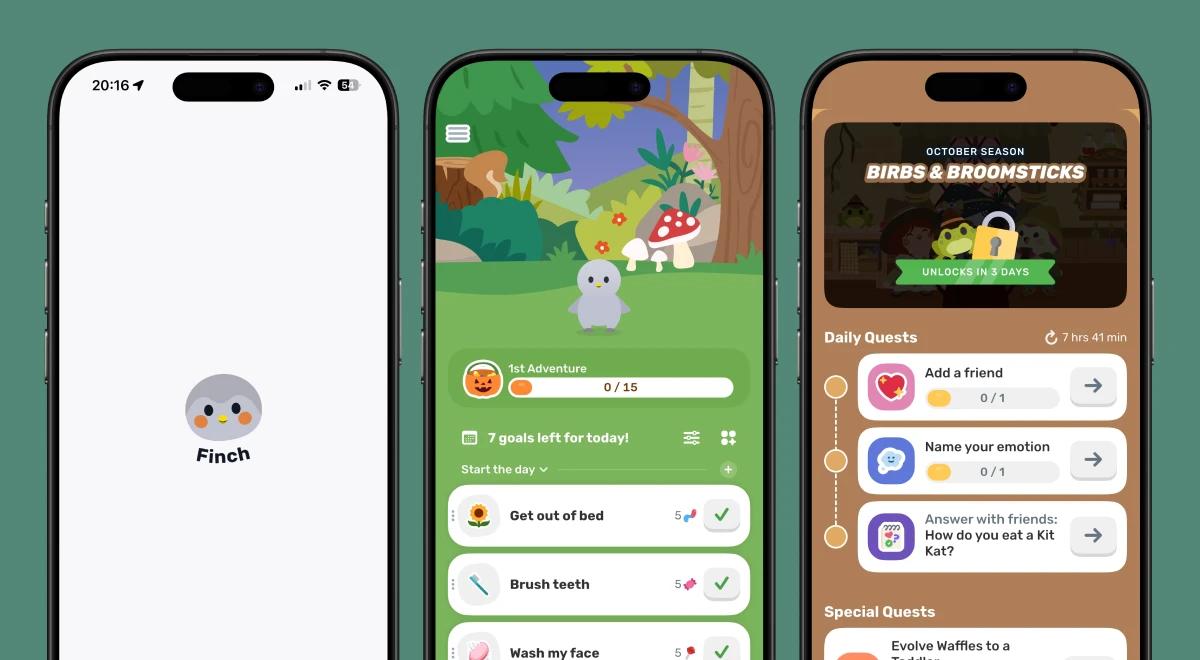
The Finch app is a self-care pet app for iOS and Android. You pick and name a virtual bird, set small daily goals, and finish them to earn energy. The bird spends that energy on adventures, and you spend your rewards in a shop. In short, it's a habit tracker with a pet attached.
Finch Care, the company behind the app, sits somewhere between productivity apps and wellness apps. Its own site, finchcare.com, shows a 5.0 rating from 500k+ ratings. That's the site's claim, so check the App Store and Google Play for current scores.
Why does it work for people who drop every habit tracker? You care for the bird by caring for yourself, and a small reward gives your brain a reason to come back tomorrow.
Finch also helps users feel less guilty about missed self-care tasks. Skip a day, and the bird doesn't suffer as a broken streak does elsewhere. The tone leans on empathy, so a missed day feels like a pause.
📘 Get one free book summary a day on Headway!
Finch app features: What the free version gives you
Here's what you get without paying, one block at a time.
Daily goals and small goals that fit your day
Finch lets you set custom goals, pick reminders, and add a home screen widget so the bird stays in view. Goals can be tiny, like drinking a glass of water, and each finished task earns energy points.
Reminders nudge you at times you choose.
The widget keeps your bird on the home screen, even when the app is closed.
Mood check-ins and progress charts
Finch lets you log your mood and look back at how your weeks add up. A progress chart shows how far you've come, and reviewers mention it as one of their favorite parts.
Breathing, journaling, and guided exercises
Finch lets you try quick breathing exercises, journal prompts, and guided check-ins on stressful days. They're designed for motivation and calm, and they don't treat anything. Plenty of the basics come with the free version, and Finch Plus adds extras.
The shop, the wardrobe, and room customization
Finch lets you spend the points you earn from self-care on items for your bird, like outfits and room decor. You can name your bird and choose how it looks too. It's the fun part, and it gives you a small payoff for every task you finish.
How the Finch friend code and community keep you motivated
A Finch friend code is how you connect with other people inside the app. Share yours, add a friend's, and you can send gifts and encouragement back and forth. Finch has a strong community of friends for support, and that's a real difference from a plain to-do list.
How do you add friends on Finch?
Find your own friend code in the app's community section.
Share it with a friend, or enter theirs.
Join each other's circle, then send gifts and encouragement.
You don't need a Facebook group or a big following for this to work. One friend or family member is enough to make the daily check feel less solitary and add a bit of humanity to a checklist. Still, a gift from a friend's bird isn't a conversation. Keep talking to the real people in your life too.
📘 Test a short daily summary next to your Finch routine on Headway!
Finch app cost: Free version vs paid version (Finch Plus)
How much does the Finch app cost? Nothing to start, because Finch is free to download and use. The optional upgrade is called Finch Plus, and it comes in two plans. The prices below match Finch's own Help Center.
| Plan | Price (USD) | Trial | Who it suits |
|---|---|---|---|
Free version | $0 | Not needed | Anyone who wants the core goals, check-ins, and bird care |
Finch Plus monthly | $9.99 per month | None stated on the Help Center page | Someone who wants to test the extras for a short stretch |
Finch Plus yearly | $69.99 per year | 7-day free trial (confirm in app) | Daily users who want the extras long term |
Do the math and the yearly plan wins. Twelve months at the monthly rate adds up to $119.88, so the yearly plan costs roughly 42% less. Prices can differ by location and between the App Store and Google Play, so trust the number on your checkout screen.
Here's what the paid version changes in daily use:
| Area | Free version | Finch Plus |
|---|---|---|
Focus timers | Standard length | Longer timers |
Soundscapes | Core set | Extra soundscapes |
Shop items | Base selection | More items to buy and use |
Three points stand out. Subscription features are mostly cosmetic. They enhance your bird's look and focus on customization. The free tier is generous, with no intrusive ads and no core features behind a paywall. And free users still get the core experience, so plenty of people discover they never need to upgrade.
Is Finch Plus worth it? A simple way to decide
Finch Plus is worth it if one of these sounds like you:
You want longer focus timers for study or work sessions.
You like extra soundscapes while you concentrate or wind down.
You've used up the free shop items and want more ways to customize your bird.
If the bird and the core routine already work for you, Plus is a nice-to-have. If you do try it, set a reminder and check what you signed up for before the trial ends. Don't wait until a charge hits your card. Trial details can vary by plan and store, so confirm the offer on your checkout screen before you tap.
Is Finch good for anxiety, stress, and depression? Where a habit tracker ends
Is the Finch app good for mental health? It can support daily routines, mood awareness, and small wins on hard days. It's a habit and self-care tool. It isn't a clinical treatment, so it can't diagnose anything or replace therapy or crisis care. Use it as one piece of a bigger support system.
So where does a tracker end? The line is easy to spot. When ticking boxes for the bird matters more than how you actually feel, the reward loop has become the point. That's the moment to step back.
If low mood, anxiety, or hopeless thoughts keep getting in the way of daily life, talk with a doctor or licensed therapist. The National Institute of Mental Health has a guide to finding help, and in the US you can call or text 988 anytime to reach the Suicide & Crisis Lifeline.
Is the Finch app safe? Age rating, privacy, and what parents should know
Several parent guides cover this, so here's the short version. Internet Matters reports a PEGI 3 age rating for Finch, but check the current rating on the App Store and Google Play listings. The same guide says parental controls aren't built in, so screen-time limits and purchase blocks come from your device settings.
On privacy and security, Internet Matters says the setup questions touch on things like mental health, age, gender, and daily challenges. The App Store listing adds that data practices can vary with the features you use and your age. Read Finch's privacy policy before you answer. Long customization sessions can also eat a lot of time for younger users.
📘 Swap a scroll session for a 15-minute summary on Headway!

Will any habit app survive week two?
Headway uses streaks to keep a daily reading habit going.
Build a streakFinch app pros: What works in daily use
The bird makes small goals feel lighter. Even simple tasks like drinking water or brushing your teeth earn energy, so a low-energy day still counts.
The free version is usable without paying. Goals, check-ins, and bird care all work with no subscription.
Friends keep you company. Gifts and encouragement from your friends arrive inside the app, no outside group needed.
Mood tracking shows a pattern over weeks. The progress chart helps you spot which weeks felt heavy and which felt light.
Missed days carry less guilt. There's no punishment for the bird so you can restart the next morning.
The home screen widget works as a quiet reminder. You see your bird every time you pick up your phone, even if you haven't opened the app.
Finch app cons: Where the app falls short
Stability complaints. A long-time user on Trustpilot reports freezing, slow scrolling, and trouble typing in recent months.
Support responses. The same reviewer says replies have become unhelpful and sometimes miss the issue she raised.
Subscription prompts. A few Trustpilot reviewers say a "7 days free" pop-up led to an immediate yearly charge. Read the Trustpilot page and the store checkout carefully.
The reward loop can turn into a chore. If the bird's needs start to feel like another to-do, the app has stopped helping.
Limited depth. Finch builds habits, but it doesn't teach you anything new.
App stability can change after updates, so check recent store reviews before you commit to a paid plan.
Finch app user reviews: What Trustpilot reviewers say
When we checked, Finch's Trustpilot page listed about 15 reviews. That's a tiny slice next to the 500k+ ratings Finch cites on its own site, so treat these as individual voices.
Rose, US, 1 review, Jun 16, 2025: This app keeps me in check, she praises the goals, the affirmations, and the hugs she can request. She spends her self-care points on room and wardrobe items, follows her progress on a chart, and named her bird after a pet she once had. Rose says she loves the app, and her comment sums it up: it keeps her on track.
Diana, RO, 3 reviews, Jun 13, 2026: Great idea, app keeps getting worse, a daily user of four years says Finch helped a lot early on. Now she reports repeated crashes, slow scrolling, a June event that disrupted her use, and new features arriving before the app is stable. Support replies miss the point, she says. She still calls it cute and helpful when it works.
Rose's review is over a year old, and Diana's is recent, so weigh them with the dates in mind.
These are selected reviews, not the full rating. Current scores are available on Trustpilot/Google Play/App Store.
Who should use the Finch app (and who should pick a different tool)
Finch is a good fit for:
People who quit habit trackers after a week and want gentle structure on low-energy days.
Anyone who likes cute, low-pressure apps where small goals count.
Look elsewhere if you:
Want clinical support, which no habit tracker can give.
Dislike gamification and would rather see a plain list.
Want to learn something new every day, since Finch doesn't teach you anything.
📘 Find your next favorite nonfiction idea in 15 minutes on Headway!
Finch vs Headway: Self-care habit tracker or daily learning habit?
Finch vs Headway is more of a pairing than a fight, since the two apps do different jobs. Finch builds the daily self-care routine. Headway builds a daily learning routine with bite-sized text and audio summaries of nonfiction bestsellers, daily insights, growth plans, challenges, and progress tracking.
| Finch | Headway | |
|---|---|---|
Main job | Daily self-care and mood habits | Daily learning from nonfiction |
Daily action | Finish goals, check in, care for the bird | Read or listen to a summary |
Best for | Building a gentle routine | Turning spare minutes into self-growth |
Use them side by side: Finch for how you care for yourself, Headway for what you learn while you do it. Neither one replaces professional support.
Why Headway works for a busy daily routine
Headway turns a full book into a summary you can finish in about 15 minutes. A short quiz about your goals builds a personalized growth plan, and the more you use the app, the better it understands what you need. Here's what's inside:
Audio and text summaries, so you can read at lunch or listen on a walk.
Spaced repetition cards and highlights that bring key ideas back before you forget them.
Offline mode for flights, subway rides, and weak signal.
Apple CarPlay and Android Auto support for hands-free listening on the drive.
Daily streaks for keeping a steady routine without the pressure of a long checklist.
One free summary every day, with a 7-day free trial on paid plans.
An AI chatbot can write a summary on demand, but it's unedited and unverified. Headway's summaries come from professional writers, editors, and voice actors, which keeps the quality steady across the whole library.
What Headway users say about building a daily learning habit
Here's what real Headway users say about fitting short daily summaries into a busy life.
"Before discovering Headway, I would usually scroll through social media or watch TV during my coffee time. Switching to focused reading turned that moment into something more rewarding."
Jessica Teitelbaum, Revenue Operations Specialist
"This app gives me the feeling of constant growth and learning without overwhelming me. The bite-sized summaries of books are brilliant."
App Store review
"Over the past two years, Headway has completely transformed my relationship with reading. The thoughtful curation, topic groupings, and gentle nudges to keep up my reading streak have helped me stay engaged in a way nothing else ever has."
App Store review
"Headway is my favorite way to continue reading and learn from books due to my tight work schedule. It is very much worth it for me to have subscribed."
App Store review
📘 Try a summary on your next commute on Headway!
More app reviews and comparisons from Headway
Want to compare book summary apps? See our Headway vs Blinkist breakdown.
Curious how a visual learning app stacks up? Read our Imprint app review.
Not sure about a subscription? See if Blinkist is worth it.
Want other self-care apps? Start with our Fabulous app review.
Prefer guided calm? Here's our Headspace app review.
Like the game angle? Try these Habitica alternatives.



Add a daily learning habit to your Finch routine with Headway
Finch is a pleasant, mostly free way to practice self-care, with real stability and billing caveats. It builds the habit of checking in on yourself, but it won't teach you anything new. That's where Headway fits, since a summary lets you preview a book and decide what deserves a full read.
Headway gives you 15-minute summaries in audio and text, personalized recommendations, and gamification like streaks and challenges. That makes it easy to slot into the same minutes you give your bird each day. Not everyone has time to read every book, and summaries are a simple way to explore first.
Download the Headway app and pair one summary with your next Finch check-in. One summary this week is plenty to start.
This review was prepared by the Headway editorial team and is current as of October, 2026. App prices, ratings, and features can change. Check the App Store, Google Play, Trustpilot, and the app's official site for the latest updates.
FAQs about Finch app review
Is the Finch app free to use?
Yes. Finch is free to download and use on iOS and Android, and the core experience works without paying. You get daily goals, mood check-ins, and bird care at no cost. An optional subscription called Finch Plus adds extras like longer focus timers, more soundscapes, and more shop items, but you can skip it and still use the app daily.
How much does Finch Plus cost per month and per year?
Finch Plus costs $9.99 per month or $69.99 per year, based on Finch's Help Center. The yearly plan works out to about $5.83 a month, which is roughly 42% less than paying monthly. Prices can vary by country and store, so confirm the exact amount on your App Store or Google Play checkout screen before you subscribe.
Is the Finch app good for anxiety and depression?
Finch can support routines and small wins on hard days, but it isn't a treatment for anxiety or depression. It's a self-care and habit tool, so it can't diagnose a condition or replace therapy. If low mood or worry keeps getting in the way of daily life, talk with a doctor or licensed therapist.
What is a Finch friend code and how do you use it?
A friend code is a short code that links your account to another person's inside the app. Share yours with a friend or enter theirs in the community section, and you're connected. From there, you can send gifts and encouragement. It's a simple way to add support to your routine, though it doesn't replace real conversation.
How do you cancel Finch Plus?
Cancel through the store where you subscribed. On iPhone, open your subscriptions in Apple settings, pick Finch, and turn off renewal. On Android, do the same in Google Play's subscriptions menu. Do it before your trial or renewal date, since deleting the app doesn't stop billing. Finch's Help Center also has a short article on canceling Finch Plus.
Can you get a refund for Finch Plus?
Refunds for in-app subscriptions usually go through Apple or Google, not the app itself. If you were charged by mistake, request a refund from the store where you subscribed, and do it quickly. Approval isn't guaranteed. A few Trustpilot reviewers say they struggled to get money back after an unexpected charge, so check your trial dates early.
What are the best alternatives to the Finch app?
It depends on the job you want done. Habitica turns tasks into a role-playing game, Headspace focuses on guided meditation, and Fabulous builds routines with coaching. If you want a daily learning habit instead of a self-care tracker, Headway offers 15-minute nonfiction summaries in audio and text, so it works well alongside Finch.
How does Finch make money?
Finch is free to download, and the optional Finch Plus subscription is its main paid product. The App Store also lists other in-app purchases, including several Finch Plus price points, so prices vary by plan. The free version shows no intrusive ads, which makes the subscription the thing to compare before you pay.