Self-growth
 Apps & Digital Tools
 Business & Career
 Success
 Growth Tools
 Psychology
 Communication
 Relationships

Did you know that recent studies suggest that taking care of a plant can be beneficial for your well-being?
But a new houseplant with no label, or yellowing leaves with no clue why, can stump anyone. This Botan App review tests the iPhone app version that names plants, checks their health, plans their care, and is created for situations like this.
Using your iPhone camera, you can identify a plant with the Botan App. All you need to do is point it at a leaf, and the app tells you what species it is and whether it's healthy. If you're an iPhone user — keep reading and find out what each step looks like.
📘 Your plants grow with a little daily care, and so do you. Get a free 15-minute book summary on Headway!
Quick answer: Botan App review in five points
Here's a TL;DR version of the main information about this plant identifier app:
Core job: Botan identifies plants, checks their health, and builds care plans in one iPhone app.
Coverage: It compares your photo with 30,000+ species.
Extras: You also get a Toxicity Check, a Light Meter, water reminders, and a chat with a botanist.
Pricing: A 3-day free trial comes first, then weekly, annual, or lifetime plans.
Verdict: It's worth it for iPhone owners who want to have plant ID and care together.

What is the Botan App?
Botan is a plant identifier app and plant care app for beginning growers, indoor gardeners, greenery lovers, and pet owners. This application identifies thousands of species and is available on the iOS mobile platform via the App Store and on Android devices.
You can still do the necessary identification of plants by checking its website at botanapp.com. The application does not include any advertisements on iPhone.
How to identify a plant with the Botan App on iPhone
The whole process is as follows on an iPhone:
Start the Botan App and press the scan function.
Click on the picture on your camera or look for one in the gallery.
Read the results: the common and botanical names of the plant, its origins, features, and care requirements.
Save the collected information to your profile for the purpose of getting the right care recommendations.
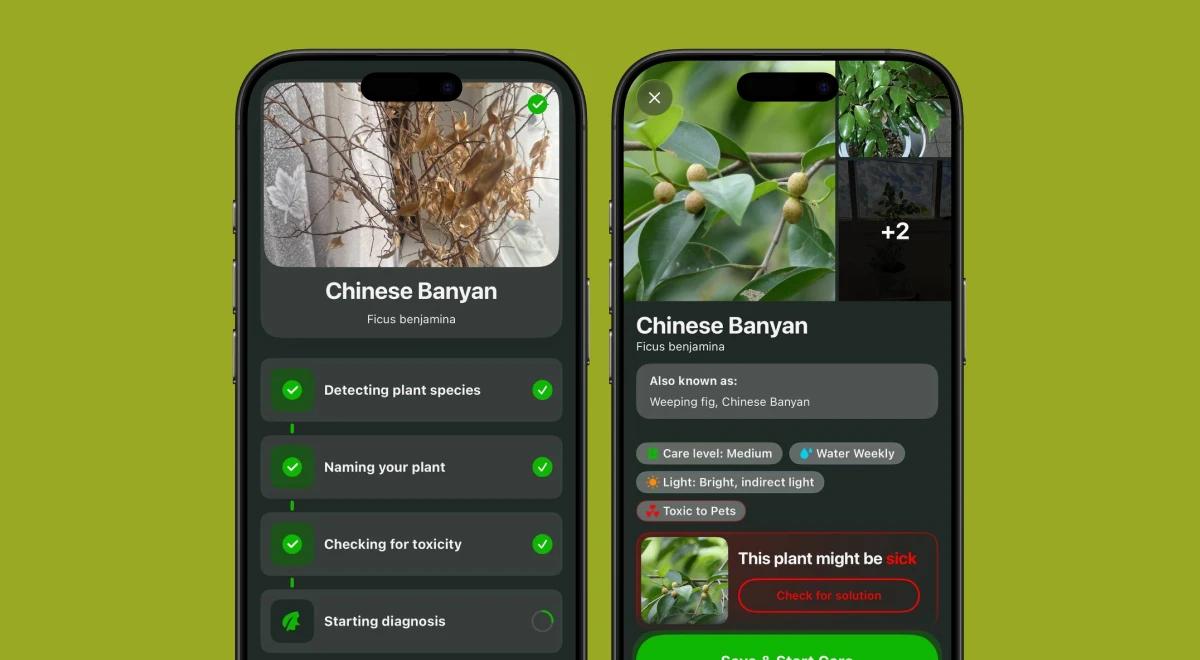
Botan App key features (identification, care plan, and others)
Botan combines identification, plant health, and care tools. Here's the overview:
| Feature | What it does | Useful for |
|---|---|---|
Plant Identification | Matches your photo against 30,000+ species | Naming an unknown plant |
Plant Problems ID | Suggests a likely cause and treatment plan | Spots, wilting, and pests |
Plant Care Plan | Gives personalized watering, lighting, and fertilizing guidance with reminders | Staying on top of care routines |
Toxicity Check | Flags toxic plants after identification | Checking toxicity for humans and pets |
Light Meter | Measures light in a spot with your iPhone camera | Placing a plant |
Botanist Chat | Answers topic-related questions in the app | Quick care help |
1) Plant identification
According to the Botan website, around 665K plants were identified via their app. It provides the closest species in its suggestions in case of an uncertain match of an image. Taking clear images of a part of a plant (flower or leaf) helps achieve better results, as dark images are less informative.
Recent studies of plant ID apps found they handle the genus better than the exact species, so double-check surprising results.
2) Plant problem ID
If you take a photo of a plant that is wilting or has some spots, Botan can detect the possible reason for that and provide the necessary treatment. Still, you should consider this tool as a source of information rather than a 100 % diagnosis.
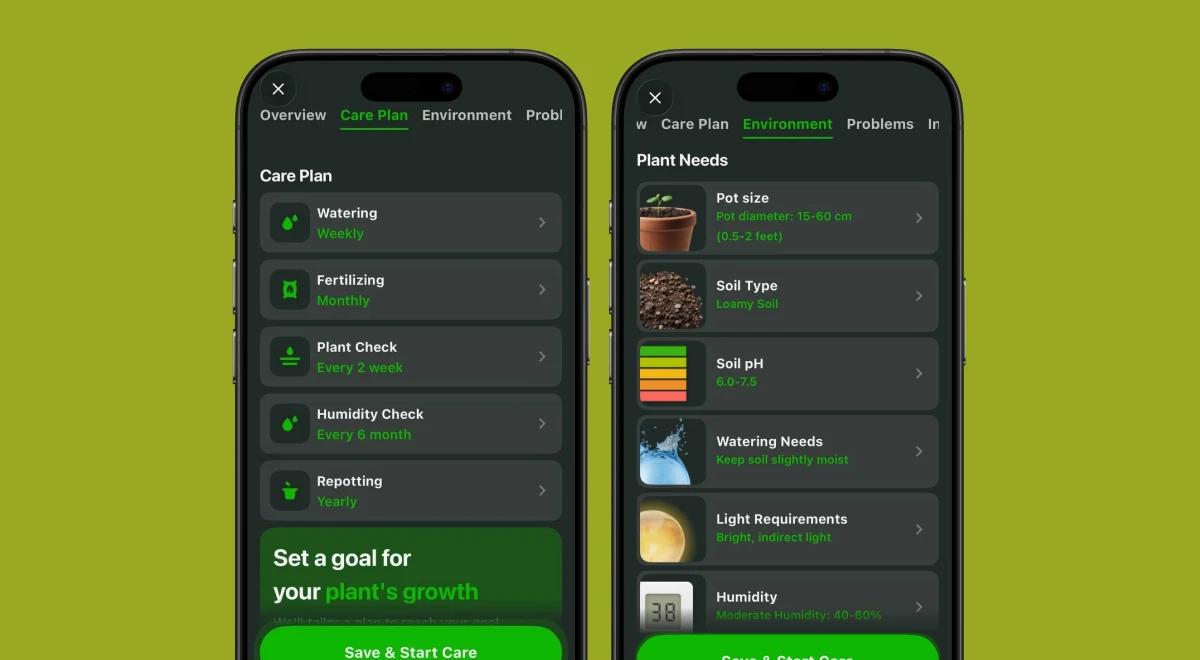
If the plant doesn't feel better, you should consider consulting with specialists in the area.
3) Plant care plan and reminders
Once you save a plant, Botan builds a care plan for its species: watering, light, fertilizing, repotting, and soil. Reminders arrive as iPhone notifications, and your saved plants live in a personal collection. Caring for your first Pothos or Aloe Vera is one of the most interesting hobbies to start small with.
4) Toxicity Check and Light Meter
Toxicity Check: The Botan App flags toxicity automatically after identification, which helps pet owners and parents.
Light Meter: Your iPhone camera measures the light in a spot and shows if it suits the plant. Neither replaces a vet or a professional.
5) Botanist Chat
Botanist Chat lets you message plant care experts inside the app. Ask about a drooping leaf or the right pot size without leaving the Botan App.
📘 Good care helps greenery thrive, and it works for you too. Try a short daily read on Headway!
Design and usability on iPhone
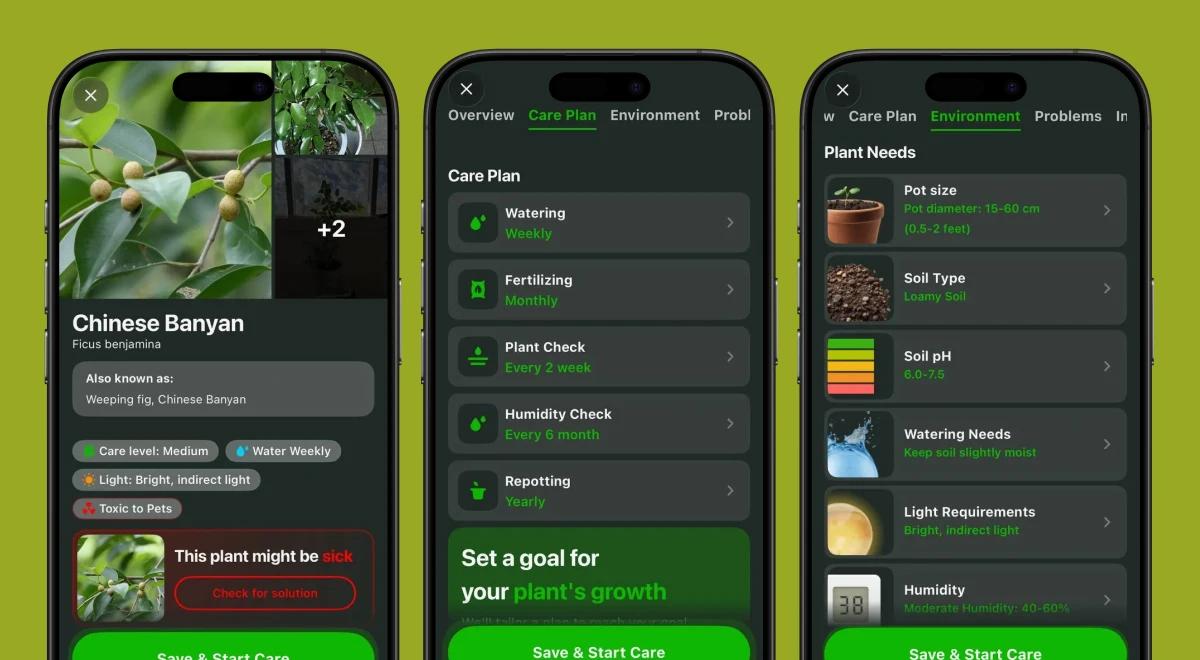
Botan needs iOS 16 or later and takes up about 448 MB, so check your storage first. The interface shows no ads, and care reminders show up as regular iPhone notifications.
Botan App pricing: trial, weekly, annual & lifetime
Core features require a subscription. Here are the plans:
Free trial: 3 days with unlimited IDs.
Weekly: $9.99.
Annual: $59.99.
Lifetime: $69.99.
*Prices and features can change and vary, so check the App Store listing before you subscribe.
Botan App review: pros and cons
Still not sure whether to consider downloading the Botan App? Look at these benefits and drawbacks before deciding:
| Pros | Cons |
|---|---|
Identification, plant health, and care in one app | Most features require a subscription, though the trial lets you test first |
Disease detection with a recovery plan | The 3-day trial is short, so test early |
Toxicity check for pet owners and parents | No community feed for sharing with other fans of this hobby |
Light Meter for placing plants | |
No ads |



So, is the Botan App worth it for iPhone users?
Botan app is also suitable for iPhone users who want to identify plants by photo and keep them healthy by providing identification, health checks, and care plans in a single app. It's great for identifying plants, and the iOS experience is smooth with no ads.
The main downside of Botan is that it is subscription-based, but it offers a free version for users to try out first. However, it's the best option for beginners as well as houseplant owners and pet owners.
Grow your plants and yourself with Headway!
Botan gives your plants a care plan and reminders. Headway does that for you, with personalized growth plans and 15-minute book summaries. Want to find more reviews? Check out these:
Deepstash review: idea cards and pricing.
Wiser app review: curated podcasts and videos.
Is Blinkist worth it?: price and value.
Is Audible worth it?: audiobooks versus summaries.
Headway vs Blinkist: side by side.
Headway gives you one free summary a day, in text or audio.
📘 Start your daily 15 minutes on Headway and watch the habit grow!
FAQs about Botan App review
What is the best app to identify plants on iPhone?
Botan is a top choice for iPhone users looking for an all-in-one app that lets them identify plants, check their health, and get reminders about care. However, if you want a free app only for identification, you might like using Seek by iNaturalist and PlantNet, although neither app offers a care plan, sends notifications, or checks the health.
Can Botan App identify plants from photos already in the iPhone Photos library?
Yes, Botan allows you to upload photographs from your Photos gallery or use the camera to capture a picture in real time. After that, the app quickly shows the name, origin, characteristics, and care tips for the plant. For the best results, take a picture of a leaf or a flower, and crop the background from the image.
Does Botan App work without a subscription?
Core features of the app, such as basic identification, can be accessed for free, while others (care guides, light meter tools, watering reminders, and disease diagnosis) require a subscription. A 3-day free trial gives unlimited access to all features, so that a user can test everything before making any payments on the app.