Self-growth
 Apps & Digital Tools
 Business & Career
 Success
 Growth Tools
 Psychology
 Communication
 Relationships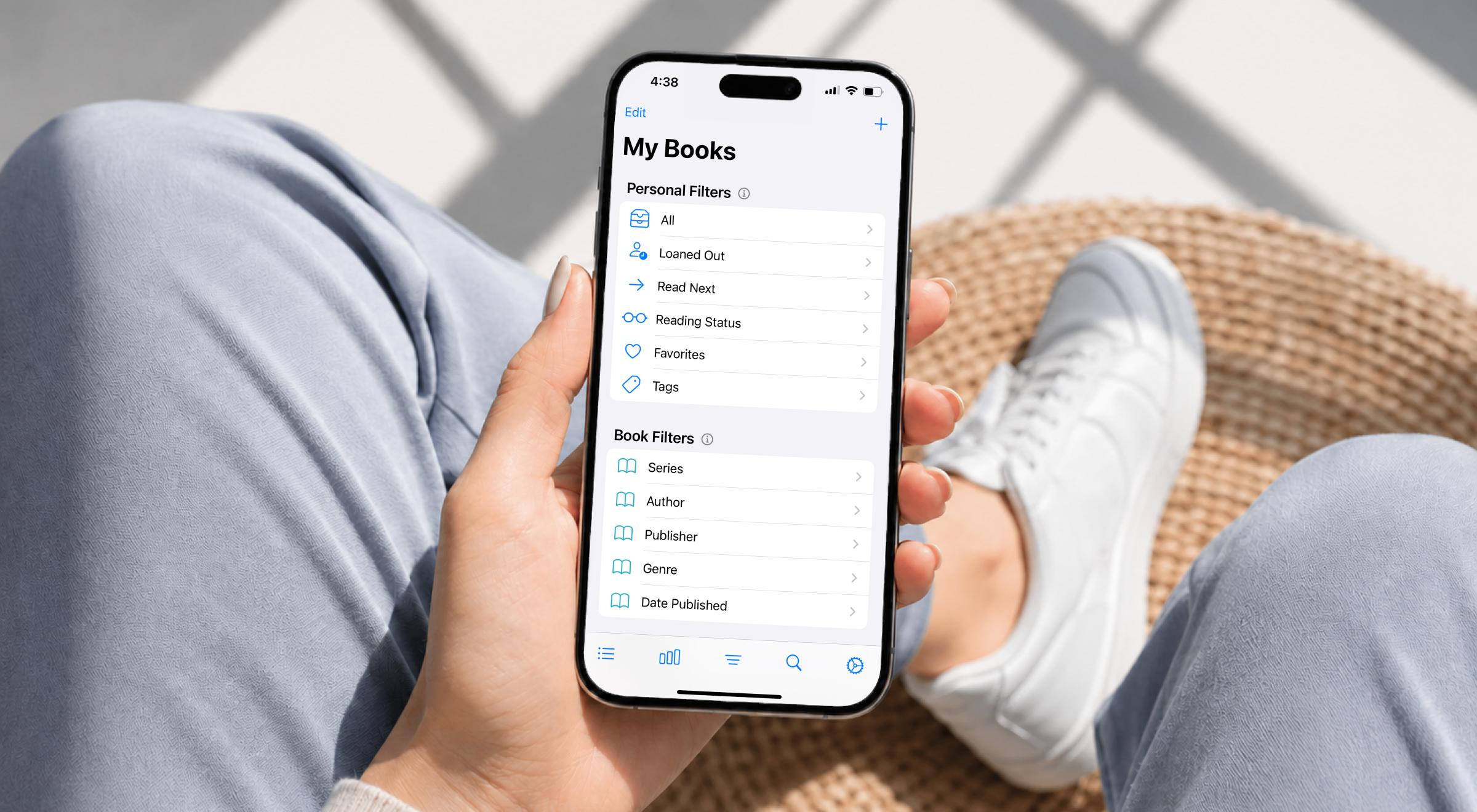

Have you ever stood in front of your bookshelf and realized it's a mess?
You found a great novel at the shop, but you can't remember if you already own it. Maybe you even bought the same paperback twice this year. This is exactly where Book Buddy steps in to help. It promises to organize your library so you never lose track again.
But before you hit download, you should know how it works and what it costs. Most importantly, you need to decide if you want to track books or actually read them. If your real goal is to absorb more from the books you read, not just track the ones you own, Headway distills the world's best nonfiction into 15-minute reads.

📘 Download Headway and start finishing more of what matters!
Book Buddy: The quick answer (TL;DR)
Book Buddy is a personal book-tracking app that helps you catalog, organize, and manage your physical book collection.
Two distinct apps share the name: BookBuddy by Kimico is a one-time $4.99 purchase, while the newer version by Gorkem Yuksel is subscription-based.
Both versions of Book Buddy allow you to scan a barcode, build a library, track loans, and manage a wishlist for new books.
While Book Buddy is built for tracking books, apps like Headway are a better fit for reading or summarizing them.
What is Book Buddy app?
Book Buddy is basically a digital librarian that lives on your phone, helping you turn a cluttered book collection into an organized database. Most book lovers know that feeling of walking into a store, seeing a beautiful cover, and having no clue if it's already sitting at home.
You can add books by scanning an ISBN or searching manually if the spine is too faded to read. It's a bit different than an app like Bookmory, which acts more like a reading diary. There is some confusion because two different developers used the same name.
The Kimico version has been a staple for avid readers since 2010. Meanwhile, the newer one at bookbuddyapp.com offers a more social, AI-driven experience. While you might use Blinkist to catch up on a non-fiction summary, this app is strictly for people who want to manage their actual, physical library.
Book Buddy features: What the app actually does
When you actually start using the app, you'll see it's built for people who take their hobby seriously. Here are the Book Buddy features that actually matter:
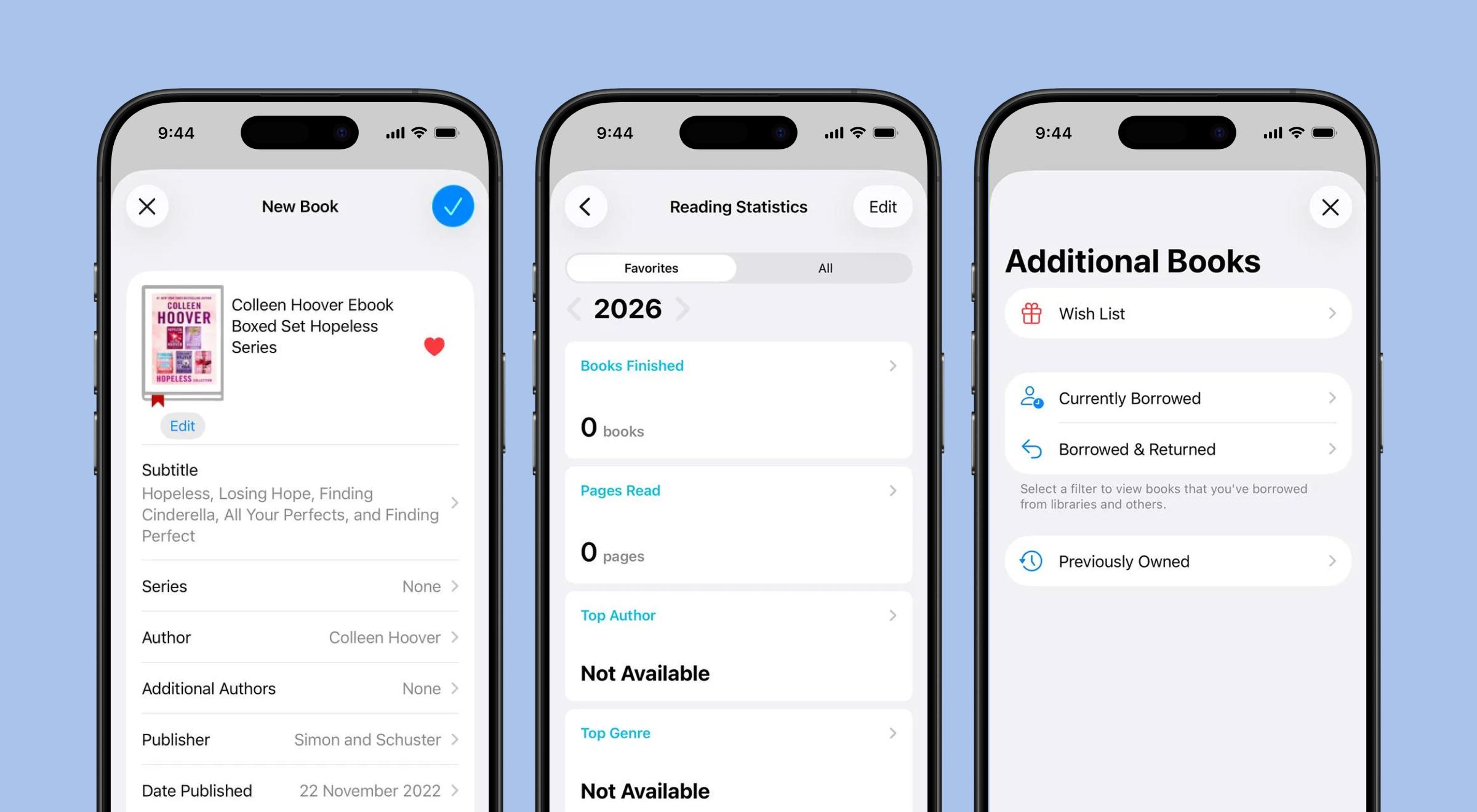
Monitor your personal reading habits effortlessly: get practical insights.
Barcode scanning — Add your new releases or old gems by pointing your phone camera at the barcode on the back of the book.
Library organization — Sort your library by sci-fi, young adult, or even those high-end graphic novels you've collected over the years.
Wishlist management — Keep a running wishlist for your next shopping spree or when you've got an Amazon gift card burning a hole in your pocket.
Reading status — Mark books as "owned," "reading," or "finished" so you never buy the same paperback by mistake.
Lending tracker — If you teach at an elementary school, the Kimico version is a lifesaver for tracking which student has which kids' book.
Personalized picks — The newer app gives you tailored book recommendations based on the library you've already built.
Custom fields — You can even log your children's books alongside a photo of your kid's favorite stuffed animal to make the library feel personal.
It's a great way for bookworms to feel like their reading life is finally under control.
📘 Stop counting your books and start finishing them with Headway.
How much does Book Buddy cost?
Pricing is usually where people get a bit confused because of those two different apps. It's not like Audible, where you know exactly what the monthly fee gets you. The original app by Kimico is great if you hate subscriptions. You can download a free version to try it out, but it limits you to 50 books.
If your bookshelf is bursting, you'll need BookBuddy Pro. It's a one-time payment of $4.99 — that's it. No monthly drain on your bank account. They also have an optional "Online Sharing" add-on for $1.99 a month if you want to publish your library on their website. So, their pricing systems comes down to this:
Online Sharing Pro (Yearly): Approx. $49.99.
Online Sharing Pro (Monthly): Approx. $4.99 - $7.49.
*Note that prices can vary based on location and updates
The newer version at bookbuddyapp.com is a different story. It works more like Duolingo or other modern apps, where you pay for a subscription. You get a free trial, but then you have to pick a plan to keep using the AI features and social tools.
It's a trade-off: if you just want to scan a barcode and be done, the $4.99 one-time fee is a steal. If you want a flashy social feed and AI help, you'll have to get used to the subscription model.
Is Book Buddy the right app for you?
Book Buddy is fantastic if you own hundreds of physical books and can't keep track of them. It's perfect for teachers managing a classroom library or for that friend in your book club who is always lending out their copies. It's a great tool for organization. If you find joy in seeing your book collection perfectly cataloged on your phone, you'll love it.
However, it might not be what you actually need. Most of us have a "to-read" pile that makes us feel guilty every time we look at it. We see New York Times bestsellers on TikTok and add them to our wishlist, but we never actually crack the spine.
Book Buddy helps you track those books, but it won't help you read them. If you're mostly an audiobook fan, you might find that tracking physical copies feels a bit redundant.
If your goal is to actually learn the stuff inside the books, cataloging them is just another way to procrastinate. You don't need a better list — you need a better way to finish the books you already have. This is a gap that even a great podcast or a book reviews site can't quite bridge.


Try Headway, an app that most readers need!
Book Buddy is a solid app for the specific job of organizing your home library. But most people who track their books are secretly looking for a way to be more productive. The real win isn't having a tidy shelf; it's actually knowing what's inside those pages.

If you find yourself scrolling through the Bookey app or checking out Storyshots for quick hits, you're already looking for a shortcut.
This is where Headway makes the most sense. Instead of just looking at a list of books you want to read, you can actually get through them. We condense best-selling nonfiction into 15-minute summaries. You get the big ideas from authors like James Clear and Brené Brown.
While the Imprint app uses visual storytelling, Headway focuses on making those core lessons stick in your brain during a quick commute or a workout. You can stop worrying about the ISBN of a book you haven't touched in a year. Instead, start absorbing the insights that actually change your life.
Whether it's a guide on focus by Cal Newport or a deep dive into habit building, the info is ready when you are. You've spent enough time organizing your books. Now it's time to start reading them.
📘 Join Headway to read more, learn faster, and become the best version of yourself!
FAQs about Book Buddy
What is Book Buddy?
It's a mobile app that helps you catalog and organize your physical books. By scanning a barcode or typing in an ISBN, you can build a digital version of your home library. It makes it easy to see what you own, what you've finished, and what you've lent to friends, so you never lose a copy again.
How do I use Book Buddy?
You simply open the app and use your phone's camera to scan the barcode on the back of any book. The app automatically pulls up the title, author, and cover art. From there, you can add it to custom categories, track your reading progress, or add it to your wishlist for your next trip to the shop.
Is Book Buddy free?
Both versions of the app have a free option, but they come with limits. The Kimico version lets you track 50 books for free before asking for a one-time $4.99 Pro upgrade. The newer version by Gorkem Yuksel is free to download but requires a subscription to unlock the more advanced AI and social features.
Does Book Buddy have audiobooks?
Book Buddy is mostly designed for tracking physical books, but you can manually add audiobooks if you want them in your catalog. However, it doesn't play them. If you're looking to listen, you'd still need a dedicated player. It's more of a filing cabinet for your titles rather than a media player for your ears.
Can I share my library with friends?
Yes, both versions offer ways to show off your collection. You can export your list or use the built-in social features to see what your friends are reading. This is great for book clubs where everyone wants to swap copies. It saves you from that awkward moment of wondering who actually has your favorite novel.